Trinity Shaper is a transient shaping plug-in developed by Three-Body Technology that lets you control the dynamics of audio freely. Building on conventional two-stage processing (attack and sustain), it adds its own "Body" stage for triple-stage processing, so the decay and the reverberant tail can be adjusted separately. It also offers single-band and multi-band modes, covering everything from a single instrument to a whole mix. High-quality processing with ADAA (Anti-Derivative Anti-Aliasing) technology and precise control of frequency ranges with Focus Filters enable professional sound design.
An Innovative Plug-in for Freely Controlling Audio Dynamics
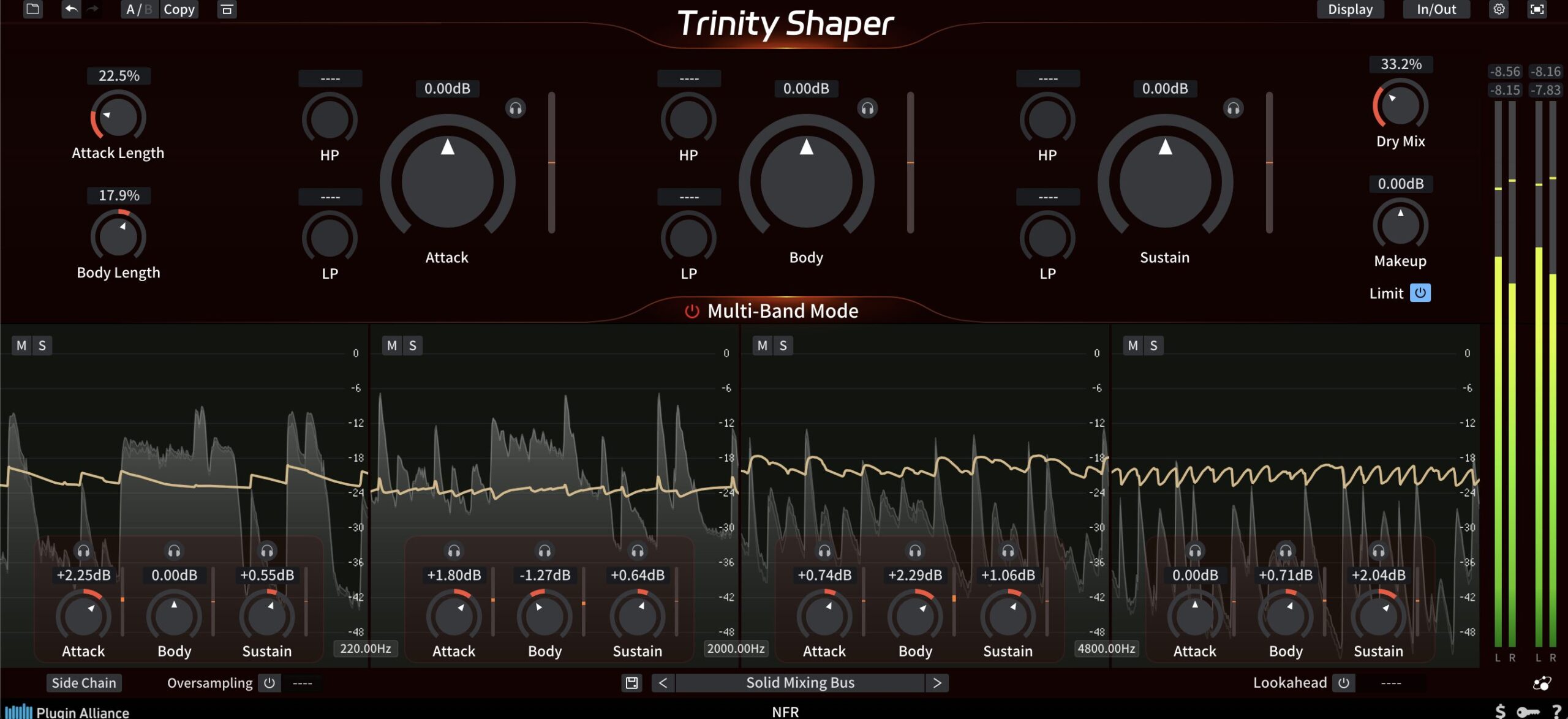
Trinity Shaper, developed by Three-Body Technology, is an innovative plug-in effect that lets you freely control the transients of audio.
Just by turning knobs, you can emphasize the punch of a sound, adjust its decay or boost the room sound, using it effectively in mixing and sound design.
You can also fine-tune the dynamics of an entire song.
This article explains the main features of Trinity Shaper and how to use them in detail.
Audio Comparison
We created a sample song so you can compare it with and without Trinity Shaper.
Please listen with a focus on the drums.
In the sample, the kick felt too prominent in the song, so we used Trinity Shaper to tone down its presence.
We also tamed the snare and hi-hat slightly, and compared with before, you can probably hear that the drums blend into the song better.
The drums in the sample song were combined on a single track, making it difficult to process them individually.
Even in such situations, Trinity Shaper is very convenient because it lets you adjust specific parts effectively.
This time, we also used Trinity Shaper on the Pluck and Pad parts.
For the Pad part, we introduce a technique for adding rhythm with Trinity Shaper.
Please read to the end.
ADAA Technology
Trinity Shaper integrates the ADAA (Anti-Derivative Anti-Aliasing) technology also found in the company's Cenozoix Compressor.
ADAA technology suppresses aliasing and the distortion characteristic of digital processing without using oversampling, faithfully reproducing the original sound.
An improved envelope detection algorithm maintains the transparency of the sound, and processing in the time domain prevents unwanted noise.
Using it together with oversampling suppresses aliasing even more effectively.
* Oversampling and aliasing are covered in detail in a later section.
Triple-Stage Processing: Attack, Body and Sustain
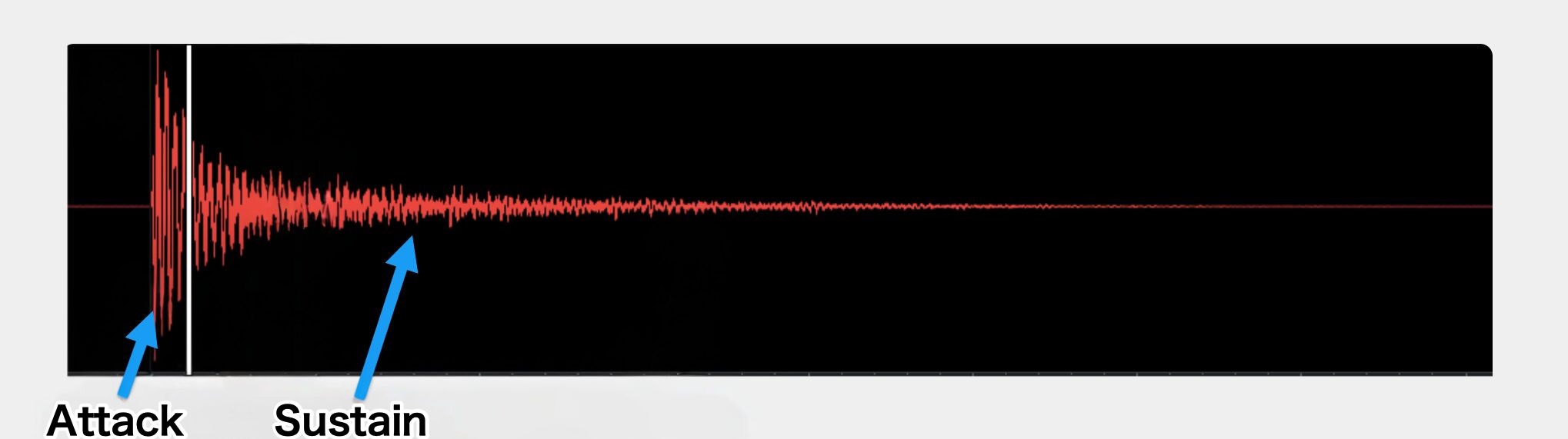
Conventional transient shapers typically process sound in two stages: the onset of the sound as "Attack" and everything after it as "Sustain."
With this approach, the sustain includes not only the decay and reverberant tail but also unwanted sounds such as recording noise, making it difficult to shape the sound as intended.
So Trinity Shaper adds its own intermediate stage called "Body," achieving three-stage triple-stage processing.
What Is the Body Stage?
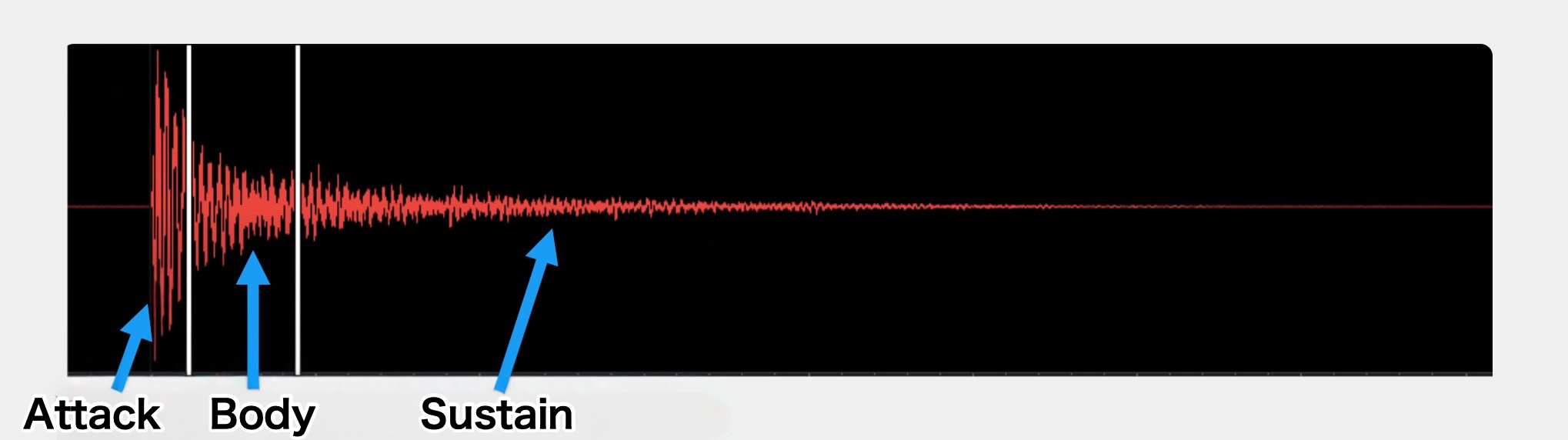
The Body stage focuses on the 20 to 50 milliseconds of audio after the transient and treats it independently as the "body."
This lets you adjust the decay and the reverberant tail (sustain) separately, allowing highly flexible sound shaping.

To use Trinity Shaper, first insert the Trinity Shaper plug-in on the track you want to adjust.
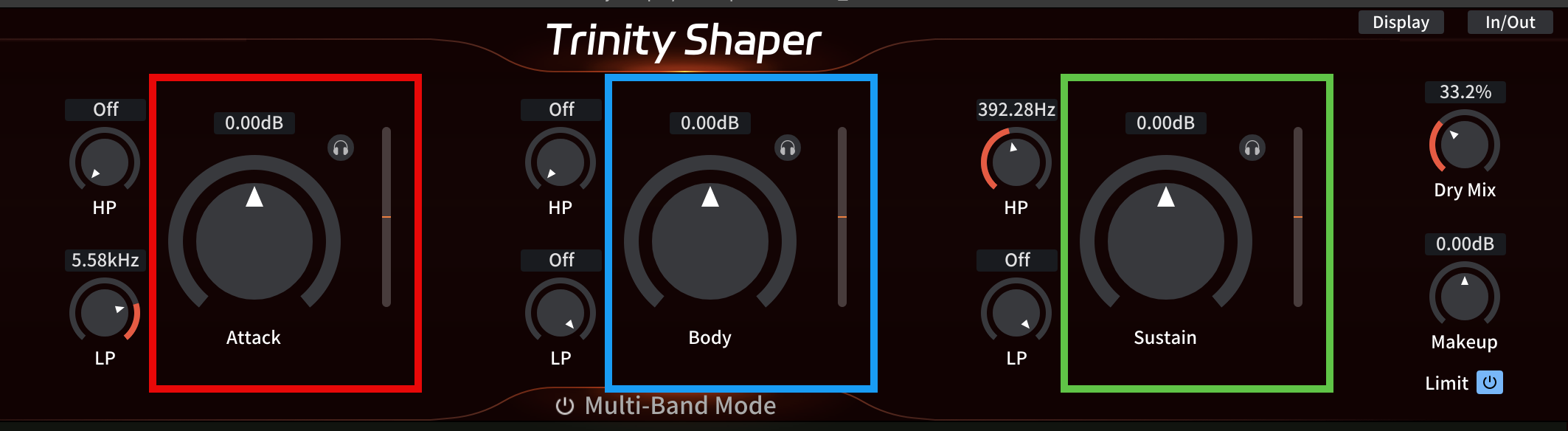
Adjust each stage.
The specific adjustments are as follows.
- Attack (red): adjusts the onset of the sound; raising the value emphasizes its impact
- Body (blue): adjusts the part between the attack and sustain, controlling the thickness and presence of the sound
- Sustain (green): adjusts the sustained part of the sound, controlling the length of the tail
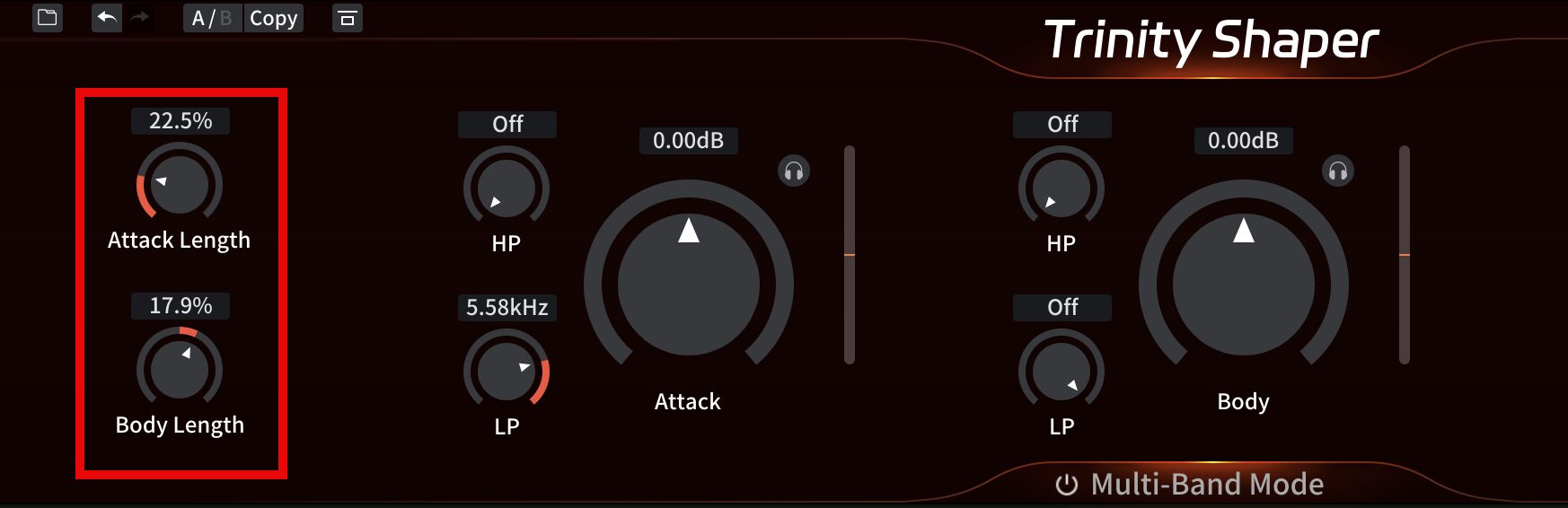
You can also adjust the lengths of the Attack and Body stages individually to target specific parts of the sound for changes.
- Attack Length: adjustable from about 10 ms (0%) up to about 60 ms (100%)
- Body Length: adjustable from about 10 ms (-100%) to about 120 ms (100%)
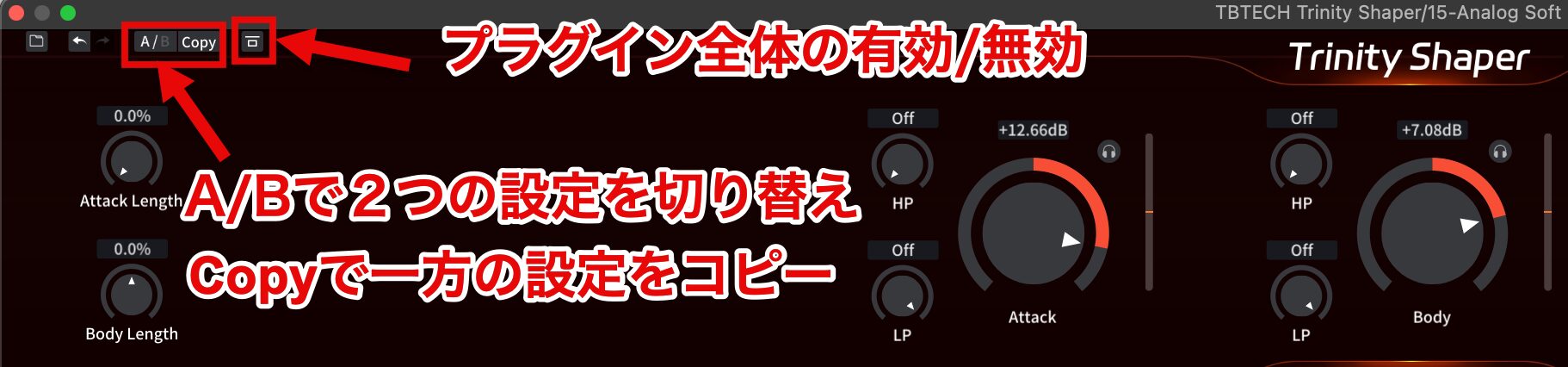
The A/B switch lets you switch between two different settings to quickly compare the difference.
Click the "Copy" button to copy the current settings to the other state.
To enable or disable Trinity Shaper, click the button to the right of the Copy button.
Frequency Range Controls
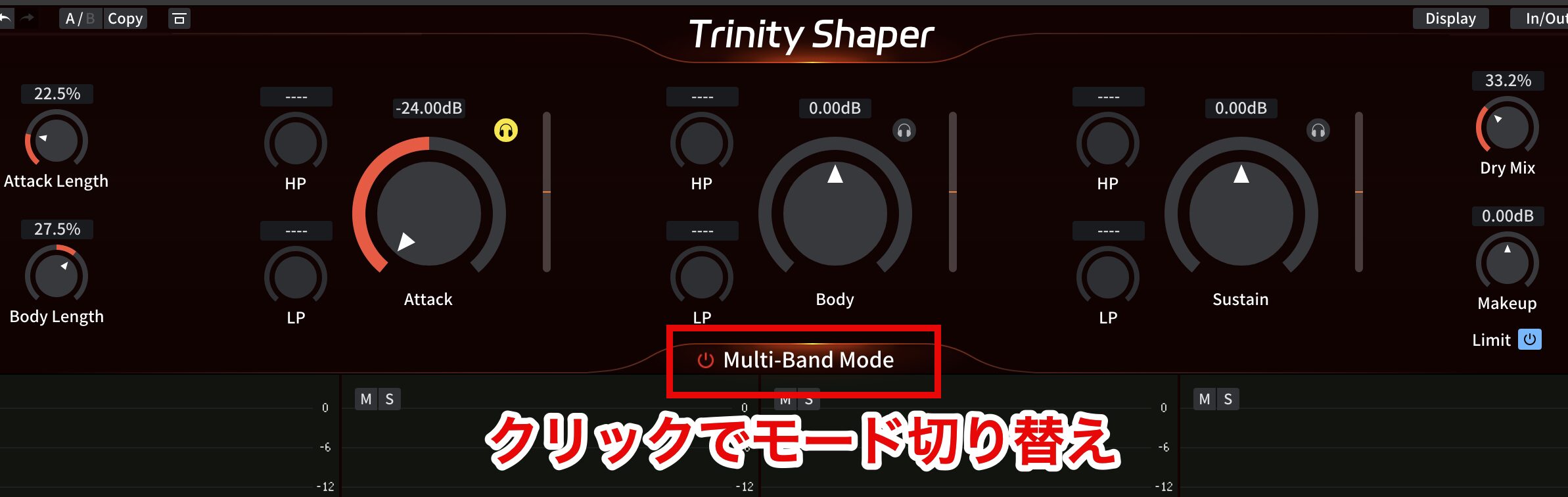
Trinity Shaper includes "single-band mode" and "multi-band mode" as features for processing specific frequency ranges of a sound effectively.
To switch between single-band and multi-band, click "Multi-Band Mode."
- Single-band mode: processes the full frequency range together; effective for a single instrument or sound
- Multi-band mode: splits the input signal into four frequency bands and processes them individually; effective for buses and whole mixes
Focus Filters
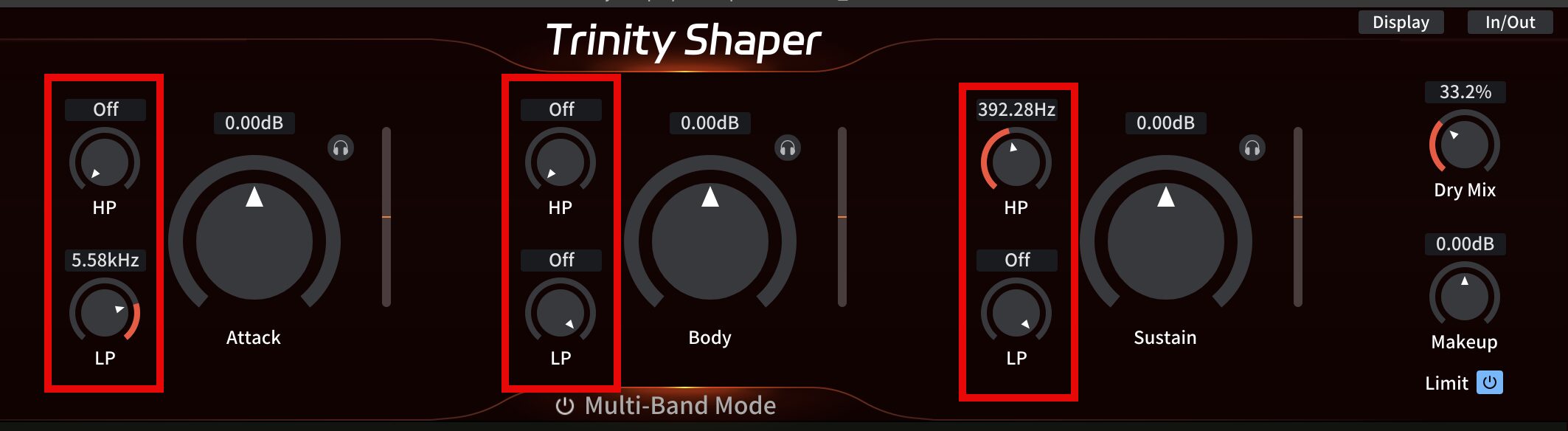
Focus Filters are a feature available in Trinity Shaper's single-band mode.
Each stage (Attack, Body and Sustain) has a high-pass filter and a low-pass filter for cutting unwanted lows and highs, so you can process only the range you are targeting.
For example, you can emphasize the attack of a snare while suppressing high-frequency noise, thicken a sound or control excess reverberation to balance the whole mix.
Emphasizing a Pluck's Attack to Make It Stand Out
This video shows how to bring out the attack with Focus Filters when a sound gets buried in a song.
Multi-Band Mode
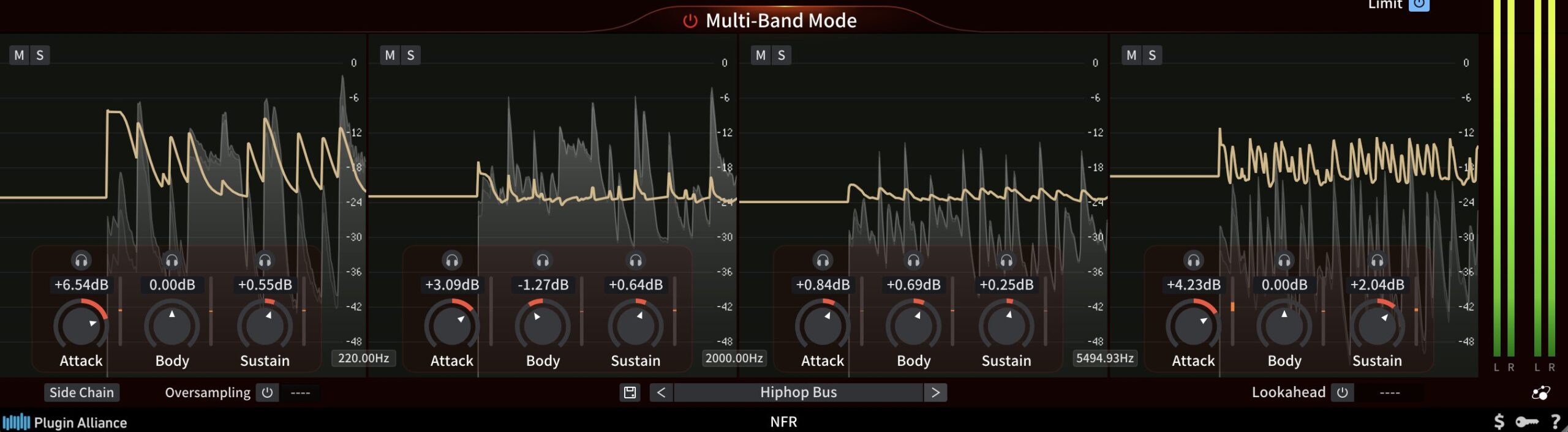
Multi-band mode lets you adjust and monitor the attack, body and sustain separately in each frequency band, so the freedom of sound shaping increases dramatically.
In addition, thanks to its "perfect reconstruction filter bank" algorithm, when no level adjustments are made, the processing introduces no delay or change in sound quality at all.
Taming the Drum Attack to Blend It into the Song
This video shows how to tame the attack with multi-band mode and blend the drums into the song when the kick and snare feel too strong.
Versatile Features for Clear Sound Quality
Trinity Shaper includes the following features in pursuit of high sound quality.
Oversampling
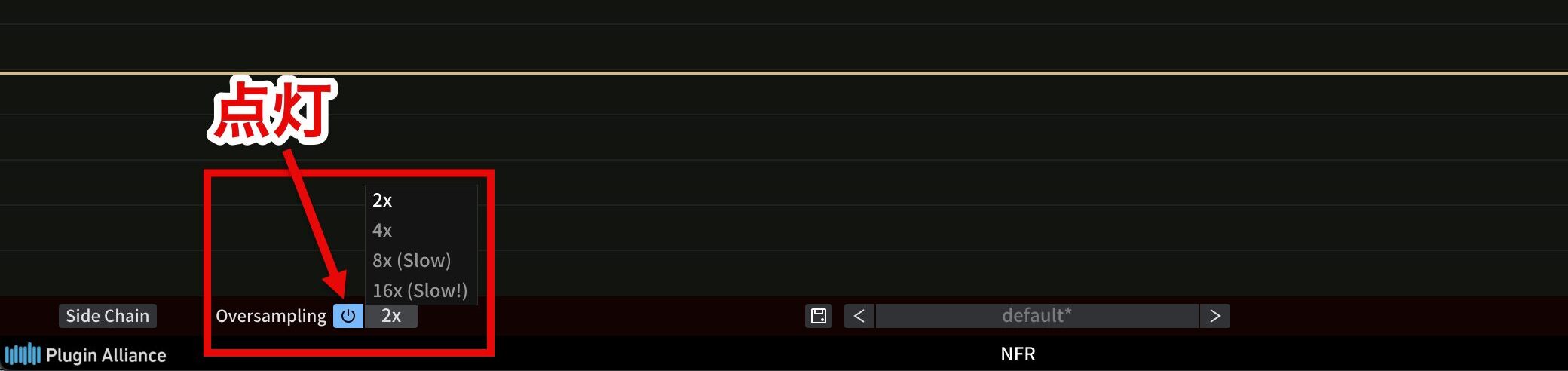
Oversampling is a technique for suppressing aliasing in digital audio.
Setup is simple: just turn on "Oversampling" at the bottom left of the plug-in and choose the factor.
Aliasing is noise that occurs when audio is processed at a low sampling rate.
To prevent it, Trinity Shaper offers 2x, 4x, 8x and 16x oversampling, temporarily raising the sampling rate to achieve a clearer, more natural sound.
Choose 8x or 16x when you want high sound quality, and 2x or 4x when you want to keep CPU load down.
However, higher factors also increase latency (about 3.3 ms at 2x and about 6.1 ms at 16x), so set it with the balance between sound quality and performance in mind.
Lookahead
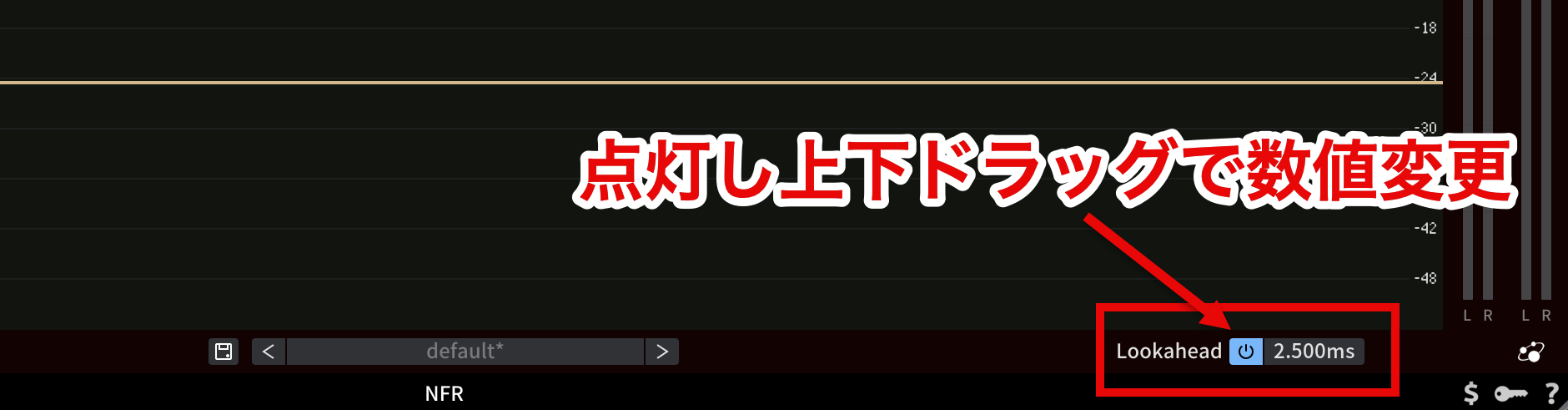
The Lookahead function handles sudden level changes more naturally.
When enabled, it reads the input signal ahead to predict transients in advance, so it can suppress unnatural distortion and excessive compression.
To use Lookahead, turn on "Lookahead" at the bottom right of the plug-in and specify the lookahead time with the value to its right.
However, when enabled, up to about 2.5 ms of latency occurs.
Also, when oversampling is used, additional latency is added regardless of whether Lookahead is enabled.
Analog-Modeled Clipper
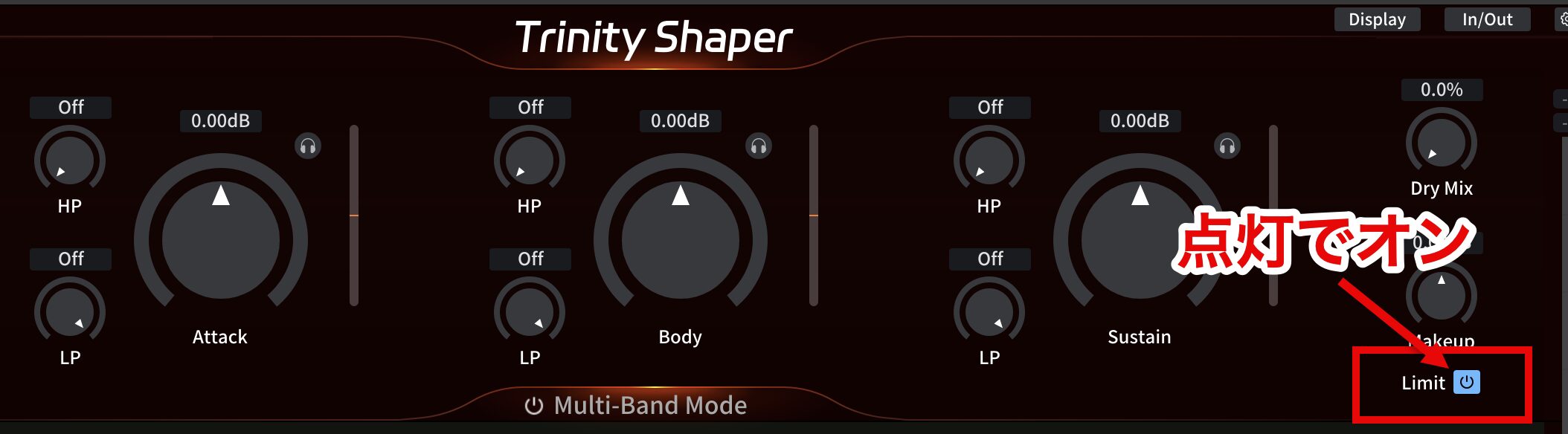
The analog-modeled clipper simulates the characteristics of analog circuits to achieve natural, musical clipping, creating a transparent, warm sound.
It is applied when "Limit" on the right side of the plug-in is lit, and it is on by default.
If you need a purer sound, you can disable Limit, but digital clipping (harsh distortion) becomes more likely.
Flexible Sidechain Control
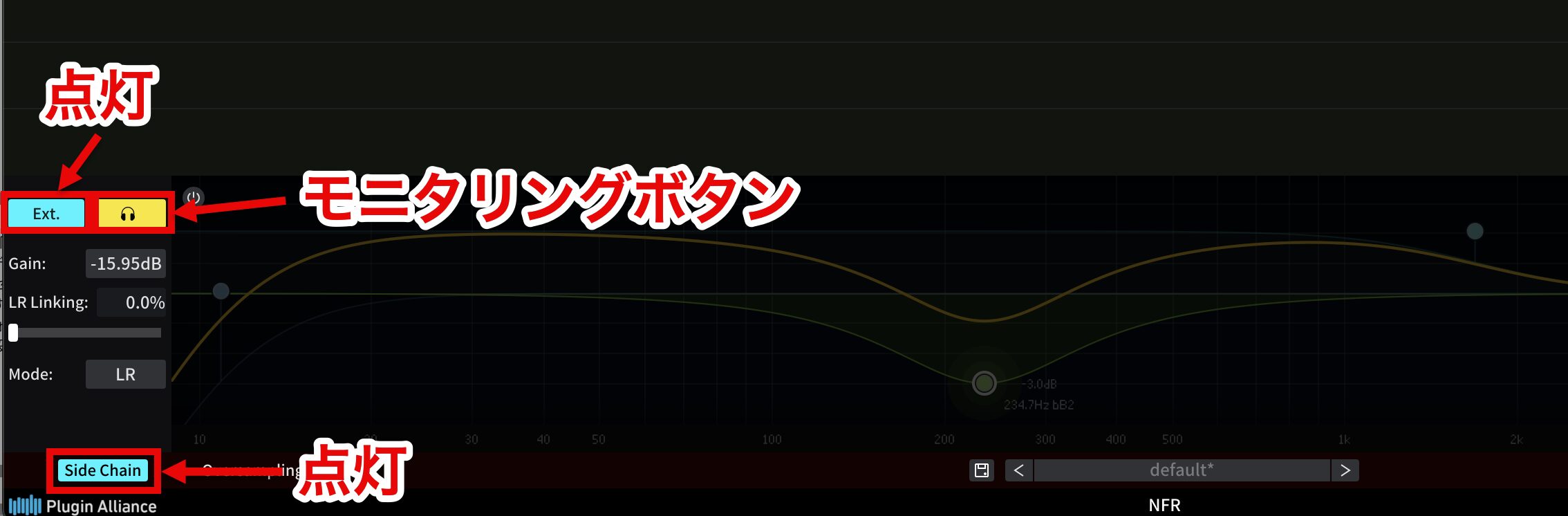
The sidechain function uses an external signal as a trigger to effectively control the dynamics of another audio signal.
To use it, turn on "side chain" at the bottom left of the plug-in and click the "Ext." button to enable the external sidechain input.
To check that the external signal is coming in correctly, click the "Monitoring" button to enable monitoring.
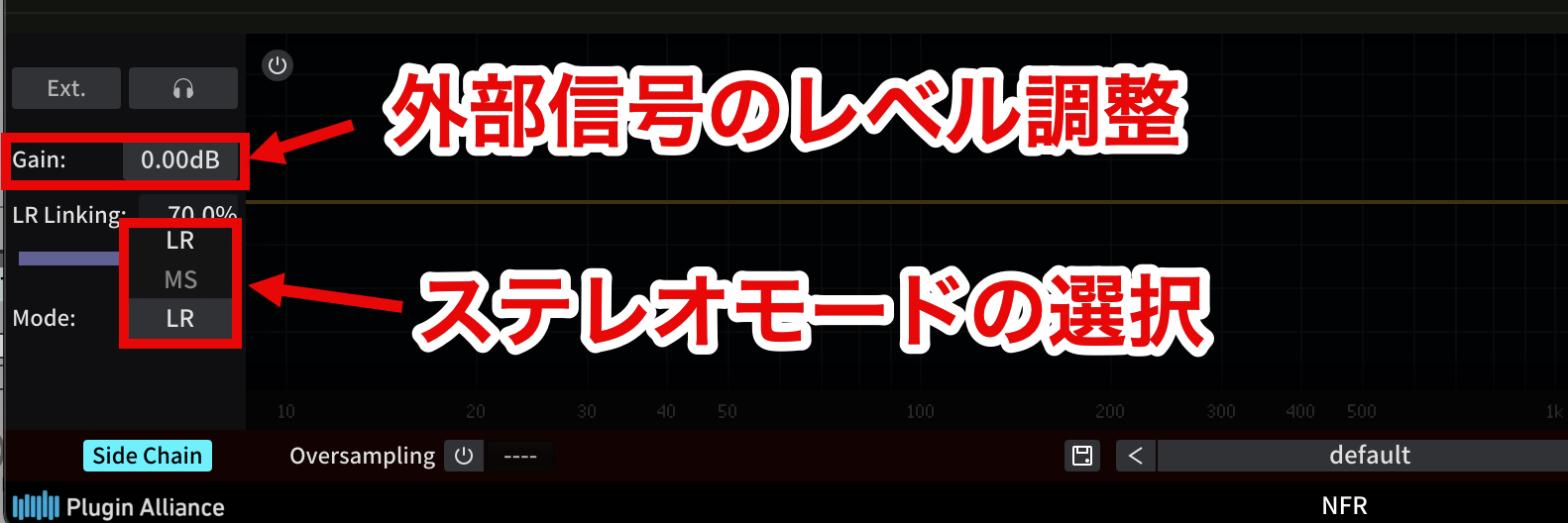
"Gain" lets you adjust the level of the external signal.
The sidechain function of this product also has two stereo modes, "LR" (Left/Right) and "MS" (Mid/Side).
- LR mode: processes the left and right stereo signals separately
- MS mode: processes the mid (center) and side (left-right) stereo signals separately
"LR Linking" or "MS Linking" lets you adjust the amount of linking between the left and right channels or the mid and side channels, based on the selected stereo mode.
- 0% linking: the channels are processed completely independently
- 100% linking: the same processing is applied to both channels
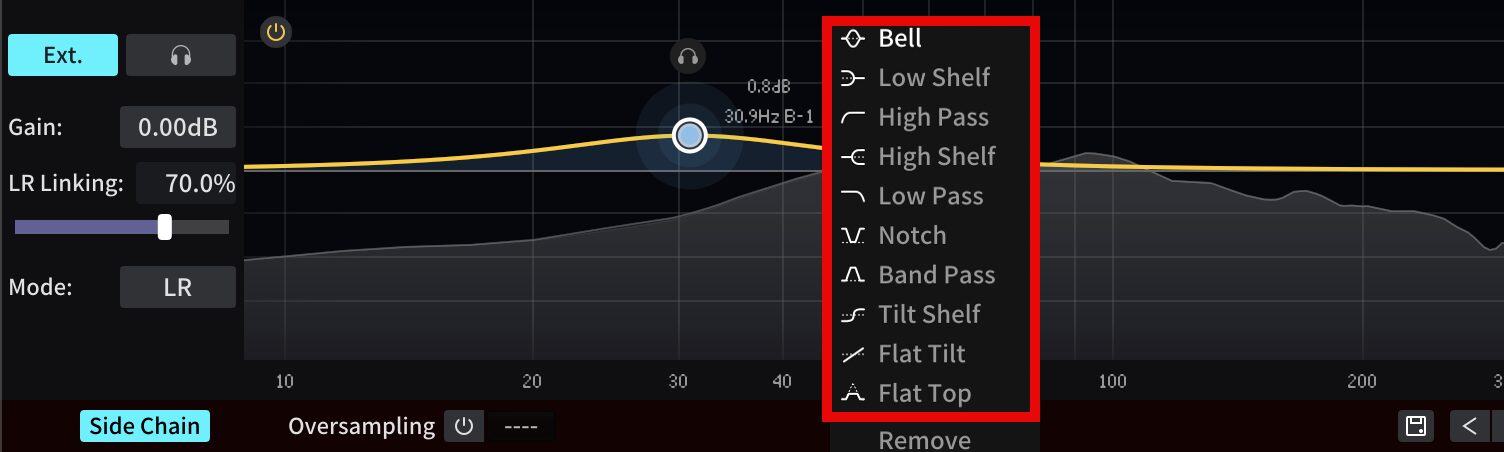
In addition, the sidechain function of this product includes Kirchhoff-EQ, the company's highly acclaimed EQ, as an 8-band parametric EQ, enabling intuitive operation and advanced customization.
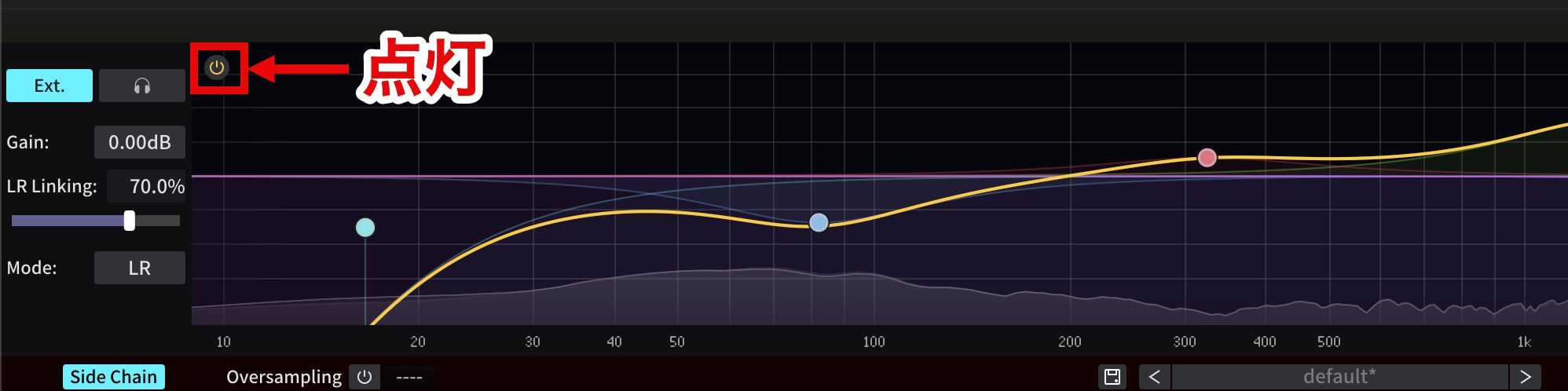
The sidechain EQ is enabled or disabled by clicking the power button at the top left of the spectrum analyzer in the sidechain panel.
Creating Rhythm with the Sidechain
This video shows a technique for using the sidechain function with an external signal as a trigger to add rhythm to a pad sound.
Using Presets: Get Close to Your Target Sound Easily
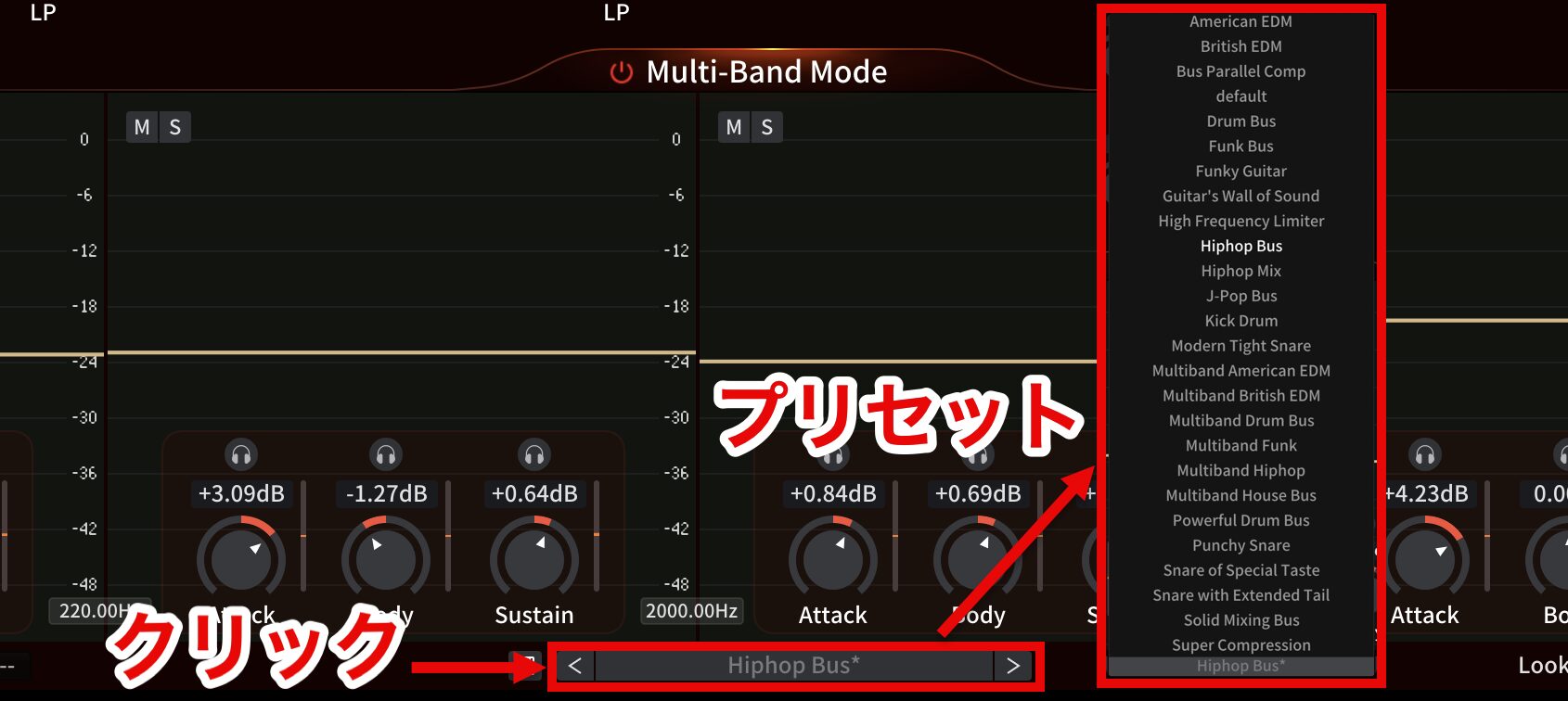
Trinity Shaper offers more than 20 presets created by professional sound engineers.
Click the preset selector at the bottom of the plug-in to show the presets.
Click the left and right arrows to switch presets in order.

Click the "disk" button on the left to show the save menu.
- Save: saves the current state as a new preset.
- Save as Default: saves the current state as the default state when Trinity Shaper opens.
- Override: replaces the selected preset with the current state.
Minimum System Requirements
- CPU: Intel or AMD CPU, or Apple silicon such as Apple's M1/M2 chips
- OS: macOS 11 (Big Sur) or later / Windows 10 or later
- RAM: 4 GB or more
- Disk space: 100 MB or more (up to 200 MB or more of free space recommended for installation)
Price and How to Try It
Trinity Shaper can be purchased at a special price until November 12.
It is sold in US dollars by Three-Body Technology and in Japanese yen by SONICWIRE.
- Three-Body Technology: regular price $199 → special price $89.99
- SONICWIRE: regular price ¥30,833 (tax included) → special price ¥13,943 (tax included) [54% OFF]
Also, if you install Trinity Shaper and log in with a Plugin Alliance account, you can start a 14-day free trial from the first activation.
Download and Trial
Take this opportunity to bring Trinity Shaper into your workflow and experience new possibilities in sound design!
Frequently Asked Questions
Q1. What can Trinity Shaper be used for?
It can be used throughout mixing and sound design, such as emphasizing or taming the punch of drums, adjusting the presence of a snare and adding rhythm to pads. Because it can process specific parts effectively even on tracks with several sounds mixed together, it works with a wide range of sources, including vocals, guitar and bass.
Q2. What is the difference between multi-band mode and single-band mode?
Single-band mode processes the entire frequency range together and is ideal for a single instrument. Multi-band mode splits the signal into four frequency bands for individual processing, which is effective for buses and whole mixes and allows highly flexible sound shaping.
Q3. What is ADAA technology?
It stands for Anti-Derivative Anti-Aliasing, a technology that suppresses aliasing and digital distortion without oversampling to faithfully reproduce the original sound. An improved envelope detection algorithm maintains the transparency of the sound, and processing in the time domain prevents unwanted noise.
Q4. How far can Attack Length and Body Length be adjusted?
Attack Length can be adjusted from about 10 to 60 ms and Body Length from about 10 to 120 ms. Adjusting these individually gives fine control from the onset of the sound to its decay, letting you shape the sound as intended.
NEW ARTICLES
Latest English Articles