
When producing music in FL Studio, once you have tidied up the timing of your performance with quantize, choosing preset sounds has a big impact on the overall impression of the song. You can find the best sound efficiently by switching presets with the left and right arrow buttons on the synth window, or by selecting "Preset" from the menu to see a list of sounds sorted into categories. Previewing presets while playing a MIDI keyboard lets you quickly hear how a sound change affects the song, making production dramatically more efficient.
Choosing preset sounds that suit the song
With the quantize function in the previous section, the performance timing has been tidied up.
The phrase sounds good, but the sound is still the default setting, so it is not quite right.
FL Studio's instruments and effects come with a variety of preset sounds.
Just previewing them and choosing the ones you like
can greatly change the impression of the song.
Here we explain how to choose preset sounds.
How to switch presets
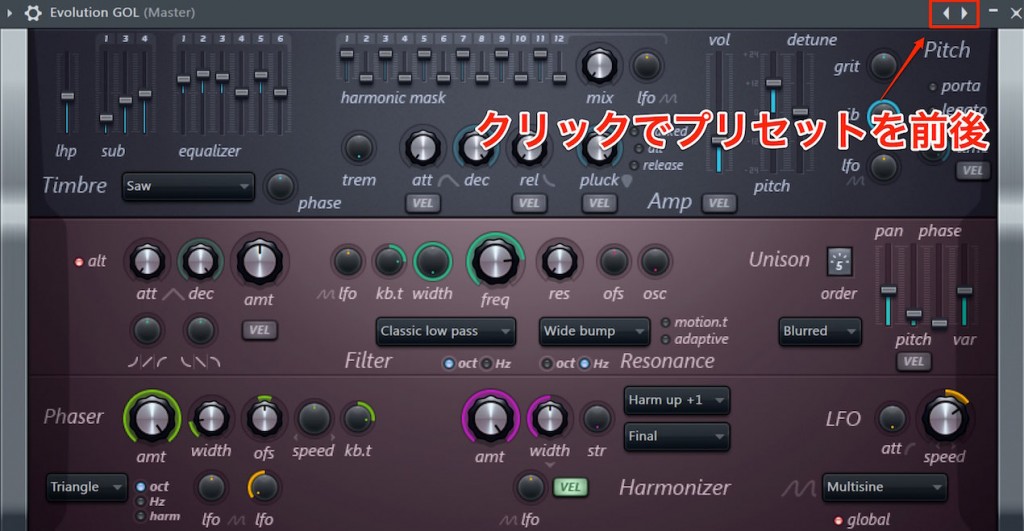
The easiest way is to press the left and right arrow buttons at the top right of the synth window
to switch presets.
If you change presets while playing a MIDI keyboard or playing back what you have programmed,
you can check sounds quickly, which is very convenient.
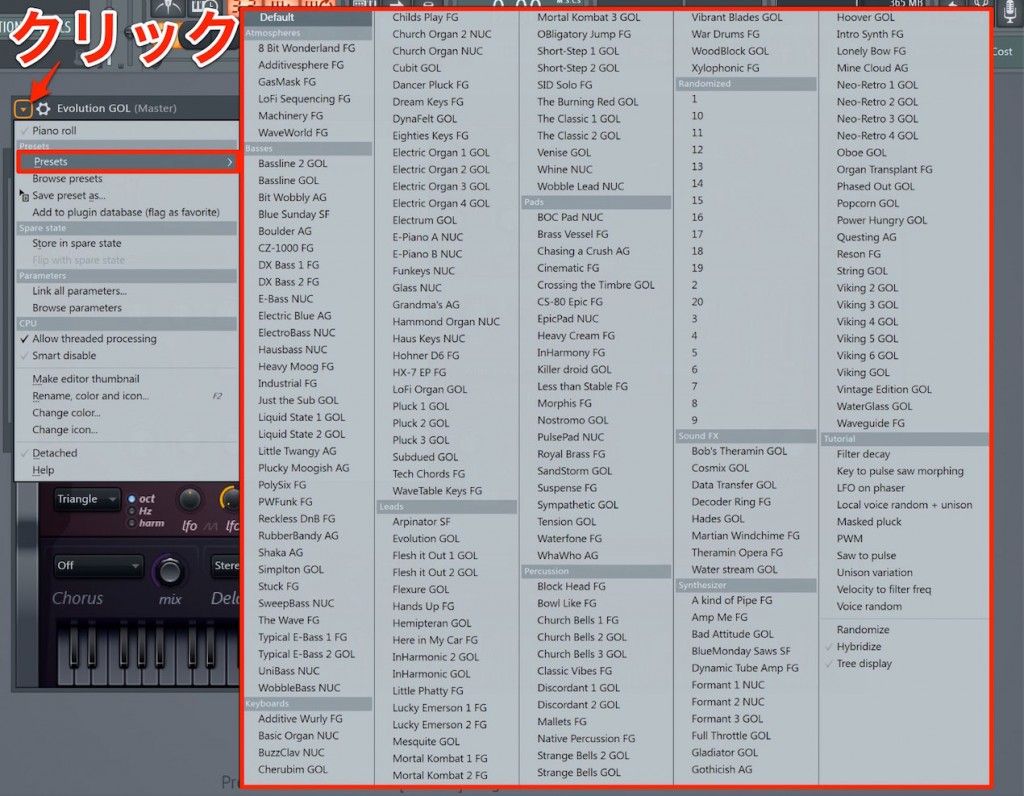
Click the arrow icon at the top left of the window
and select "Preset" from the menu to see a list of presets.
The sounds are sorted into categories, so it is easy to grasp what each is like.
Also, after choosing a sound here,
clicking the left and right arrows switches between sounds in the same category.
This time we chose a sound from the "Lead" category.
The impression changes greatly like this.
Please take the time to choose your sounds carefully.

Frequently Asked Questions
Q1. How can I choose preset sounds in FL Studio while checking them in real time?
While playing a MIDI keyboard or playing back a programmed phrase, press the left and right arrow buttons at the top right of the synth window to switch presets. This real-time preview lets you quickly judge how each sound affects the song.
Q2. What are the benefits of preset sounds being sorted into categories?
With sounds organized into categories such as "Lead", "Pad" and "Bass", it is easier to find the kind of sound you are looking for. Because you can choose from similar sounds, you spend less time on trial and error and production becomes much more efficient.
Q3. How do I change to another sound after choosing a preset?
Within the category of the preset you chose, click the left and right arrow buttons to switch to other sounds in the same category one after another. This lets you explore similar sounds quickly.
NEW ARTICLES
Latest English Articles











