
Studio One lets you change the time signature partway through a song, so you can flexibly handle complex songs with frequent meter changes, such as progressive rock. If the time signature is constant throughout the song, you set it from the Transport; to change it partway through, right-click the bar where you want the change, choose "Insert Time Signature," and simply specify the numerator and denominator. You can also delete time signature changes you no longer need from the right-click menu, so even beginners can handle complex meter changes intuitively, greatly expanding the expressiveness of their music.
Change the Time Signature Wherever You Like
You can freely change the time signature for the whole song or partway through.
This lets you flexibly handle songs with many meter changes, such as progressive rock.
When the Song's Time Signature Is Constant
By default, the time signature is set to 4/4.
If the time signature stays the same throughout the song, set it from the Transport.

↑ Click the numerator and the denominator to set each of them.
When the Time Signature Changes Within the Song
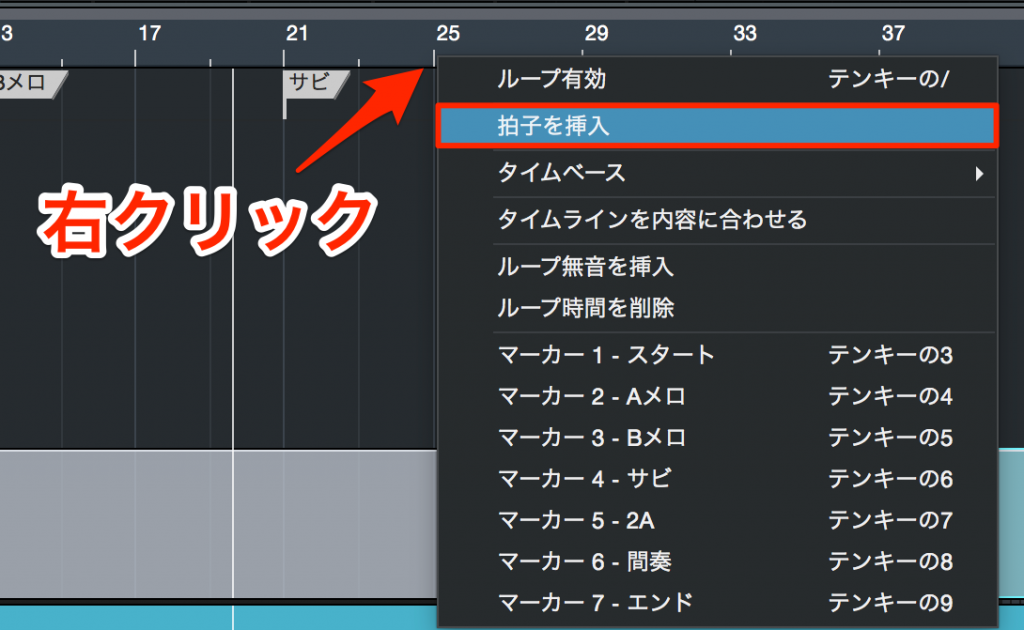
↑ Right-click the bar where you want to change the time signature
and select "Insert Time Signature."

↑ Enter the numerator and denominator and press OK.
The time signature you set is inserted at the bar you chose.
Deleting a Time Signature
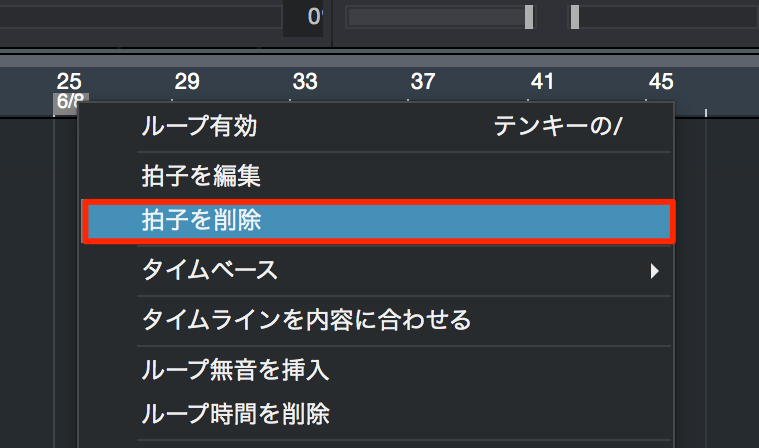
↑ Right-click the time signature you set and select "Remove Time Signature."
Time Signature Change Video
*Explained from 3:10 to 3:30.

Frequently asked questions
Q1. What is the default time signature in Studio One?
By default, every song is set to 4/4. To change the time signature for the whole song, click the numerator and denominator in the Transport and set them again.
Q2. How do I change the time signature partway through a song?
Right-click the bar where you want to change the time signature, select "Insert Time Signature," enter the numerator and denominator you want, and press OK. The new time signature applies from that bar.
Q3. Can I delete a time signature I have set?
Yes. Right-click the time signature you want to delete and select "Remove Time Signature" to delete it easily and return to the previous time signature.
NEW ARTICLES
Latest English Articles











