
Studio One's track delay function is a handy way to correct timing offsets in MIDI programming. Especially when using sounds with slow attacks, such as strings, you can shift the timing earlier or later in milliseconds without moving notes by hand. Just enter a value in the Inspector and it takes effect instantly, giving you accurate, natural groove. It is a time-saving technique that beginners and advanced users alike can use.
When a Track's Timing Is Slightly Off
When programming MIDI, even if you place notes exactly at the start of a bar, some sounds have a slow attack (rise), so the timing can feel slightly late.
This is especially common with string sounds, which have slow attacks.
The track delay function is useful in such cases (it is different from a delay effect).
It shifts the timing of the entire selected track earlier or later, saving you from correcting notes by hand and letting you adjust the timing instantly.
How to Set the Delay
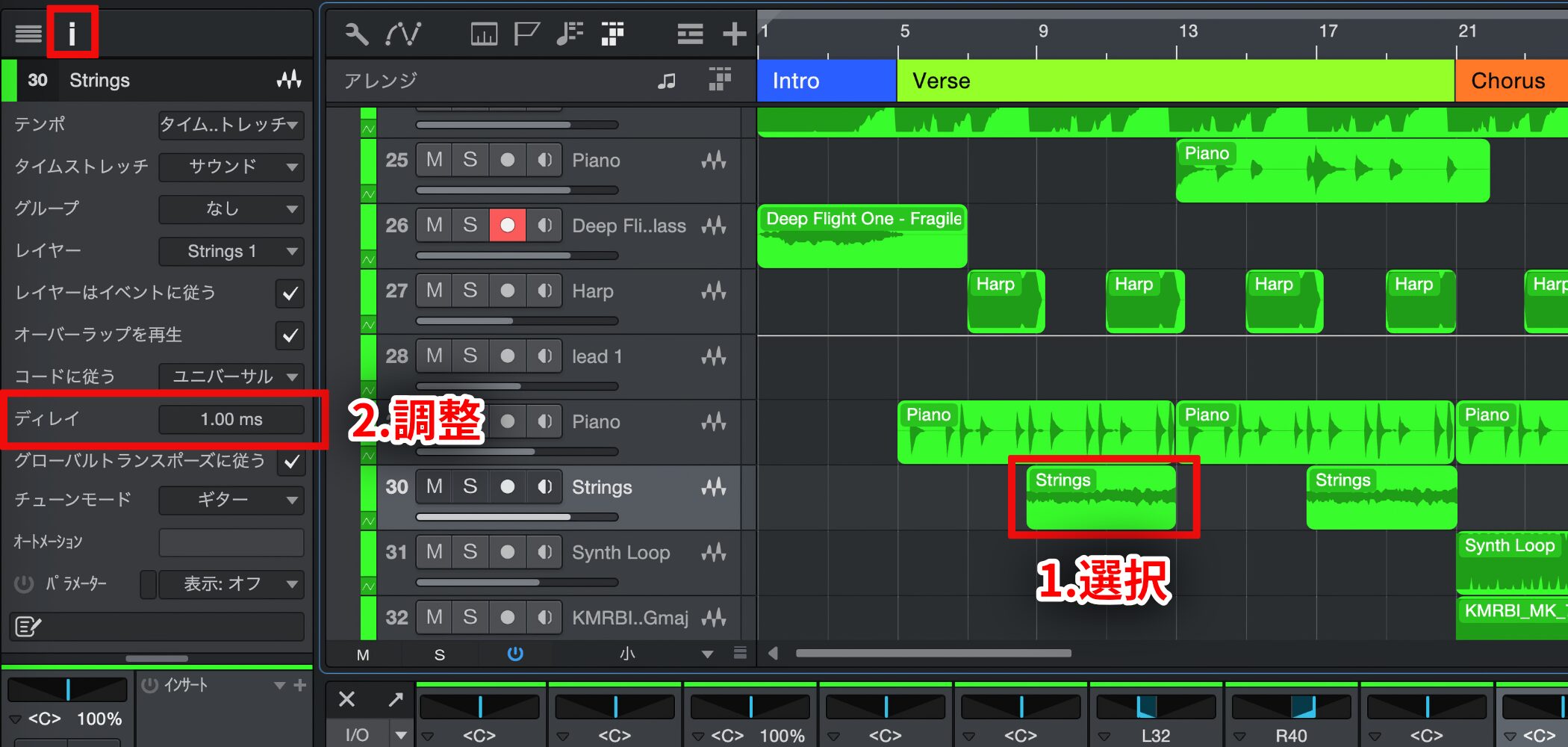
1. Select the track whose timing you want to adjust.
2. Adjust the delay value in the Inspector panel on the left.
The unit is ms (milliseconds), or thousandths of a second.
You can adjust the timing very finely.
This makes extremely precise adjustments possible.
The operation is very simple, so adjust the value until the timing is where you want it.
Milliseconds (ms) Explained

Frequently asked questions
Q1. What is the difference between Studio One's track delay and a delay effect?
Track delay adjusts the timing of the whole track, saving you from correcting notes by hand. A delay effect, on the other hand, is a separate function that adds echoes to the sound. Their purposes are different.
Q2. In what situations is the delay function useful?
It is useful with sounds that need a natural rise, such as string libraries and pads with slow attacks. It is effective for correcting cases where notes placed at the start of a bar actually sound late.
Q3. Isn't adjusting timing in milliseconds difficult?
It is very easy. Just enter a value in the Inspector panel and it takes effect, and fine adjustments are possible. You can try different values until the timing is right.
NEW ARTICLES
Latest English Articles











