
Switching Studio One's bit mode is an important setting that greatly affects how comfortable your DTM production is. In 32-bit mode, memory is limited to a maximum of 4GB, so productions that use many plugins and samples tend to become sluggish. Switching to 64-bit mode, on the other hand, lets you use virtually unlimited memory, so you can work on more complex and advanced music stably. The setting is easy on the Mac version of Studio One: just right-click it in the Applications folder and uncheck "Open in 32-bit mode."
The Benefits of 64-Bit
64-bit is becoming the standard.
Many applications are now adding 64-bit support.
In 32-bit, no matter how much memory your computer has, you can only use up to 4GB. With software running in 64-bit, however, it can recognize virtually unlimited memory, so you can work comfortably.
This setting is needed only on Mac.
How to Switch Studio One from 32-Bit to 64-Bit
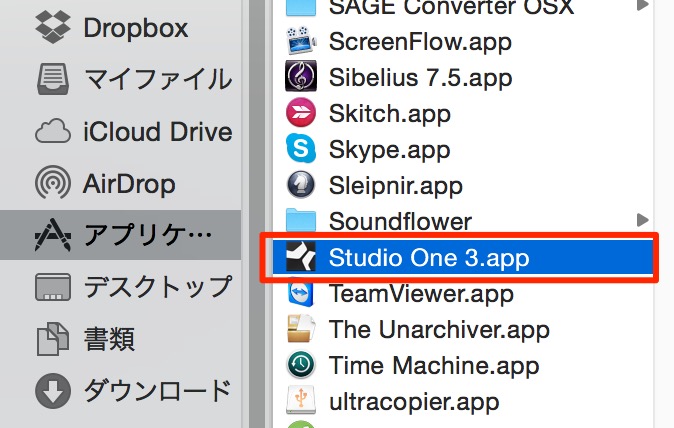
↑ Go to Studio One in the Applications folder.
Right-click Studio One and select "Get Info."
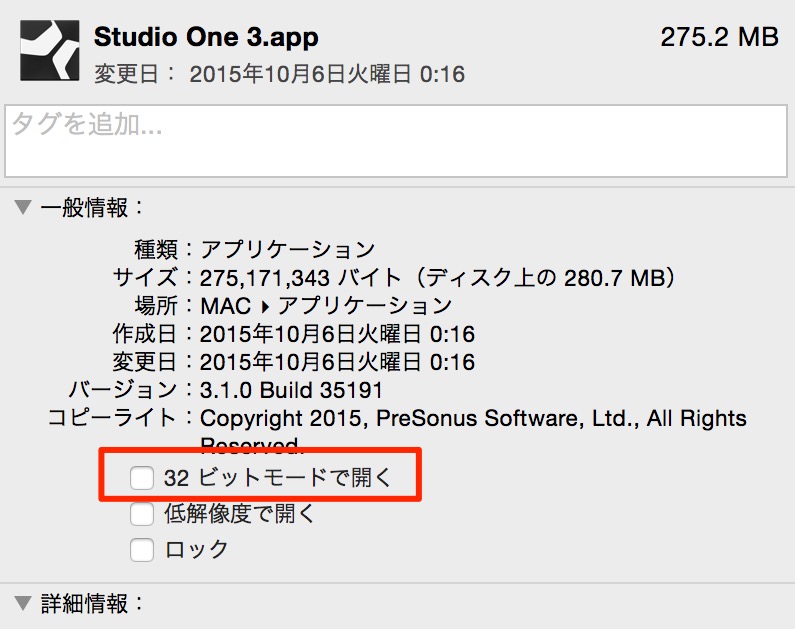
↑ Uncheck "Open in 32-bit mode," outlined in red.
From the next launch, Studio One will start in 64-bit.

Frequently asked questions
Q1. What are the benefits of switching Studio One to 64-bit?
In 64-bit mode, you can use the memory installed in your computer almost without limit. Because the 32-bit limit of 4GB disappears, your system stays stable even with many plugins and samples, preventing problems such as dropouts and playback stopping due to lack of memory.
Q2. Are there any risks in switching from 32-bit to 64-bit mode?
Basically, no. However, very old plugins or VSTs that do not support 64-bit may no longer load. You can easily switch the setting back if needed.
Q3. Can I switch to 64-bit with the same steps in Studio One on Windows?
No, the 32-bit/64-bit mode switch is needed only on Mac. On Windows, you install the version that matches your system, typically 64-bit, so no manual setting change is required.
NEW ARTICLES
Latest English Articles











