
By using the multitimbral features of software synths such as Kontakt in Logic Pro, you can manage multiple tracks with a single plugin, greatly reducing CPU load in the DAW. Assigning MIDI channels properly lets you run different sounds such as piano, bass, guitar, and synths at the same time, improving your production efficiency. Because the steps differ between Logic X and Logic 8/9, it is important to understand the setup for each version.
Extremely Effective for Saving CPU
One thing you cannot do without when using a DAW is software synths.
They can produce all kinds of sounds, from piano and drums to ethnic instruments,
and let you combine instruments however you like.
On the other hand,
the number of software synths inevitably grows,
and CPU usage often gets in the way of your work.
To solve this problem, many products
let you load multiple instruments inside a single software synth.
This way,
even when you use several instruments, such as piano, bass, guitar, and synths,
a single software synth is enough, saving a great deal of CPU.
- Logic X
- Logic 8/9
How to Use Multiple Sounds in One Software Synth in Logic X
Here, we use the high-quality multitimbral instrument "Kontakt" as an example.
Of course, this method works with any software synth that can load multiple instruments.
The method in the video above is recommended, but the following method also works.
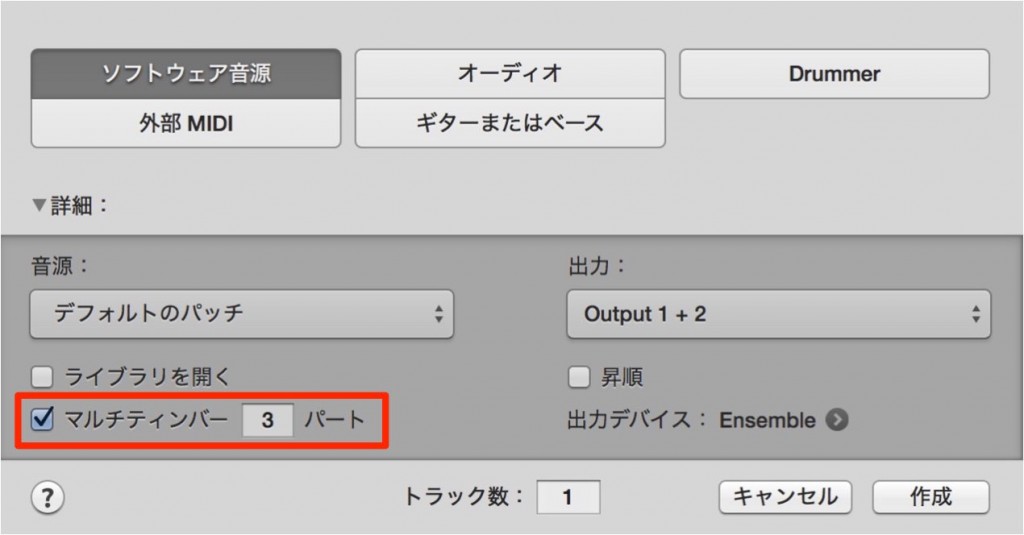
Select the number of instruments you want to play from one software synth and press Create.
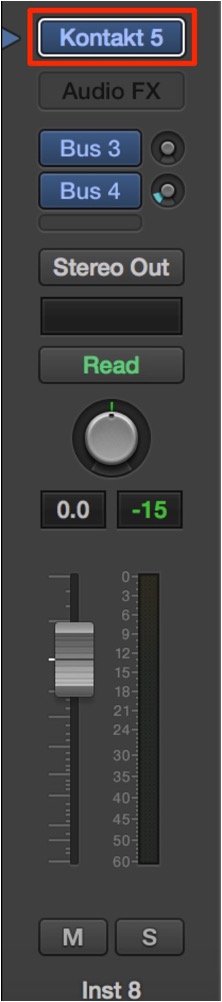
Load the software synth on an instrument track as usual.
Three tracks are created, but any of them is fine.
>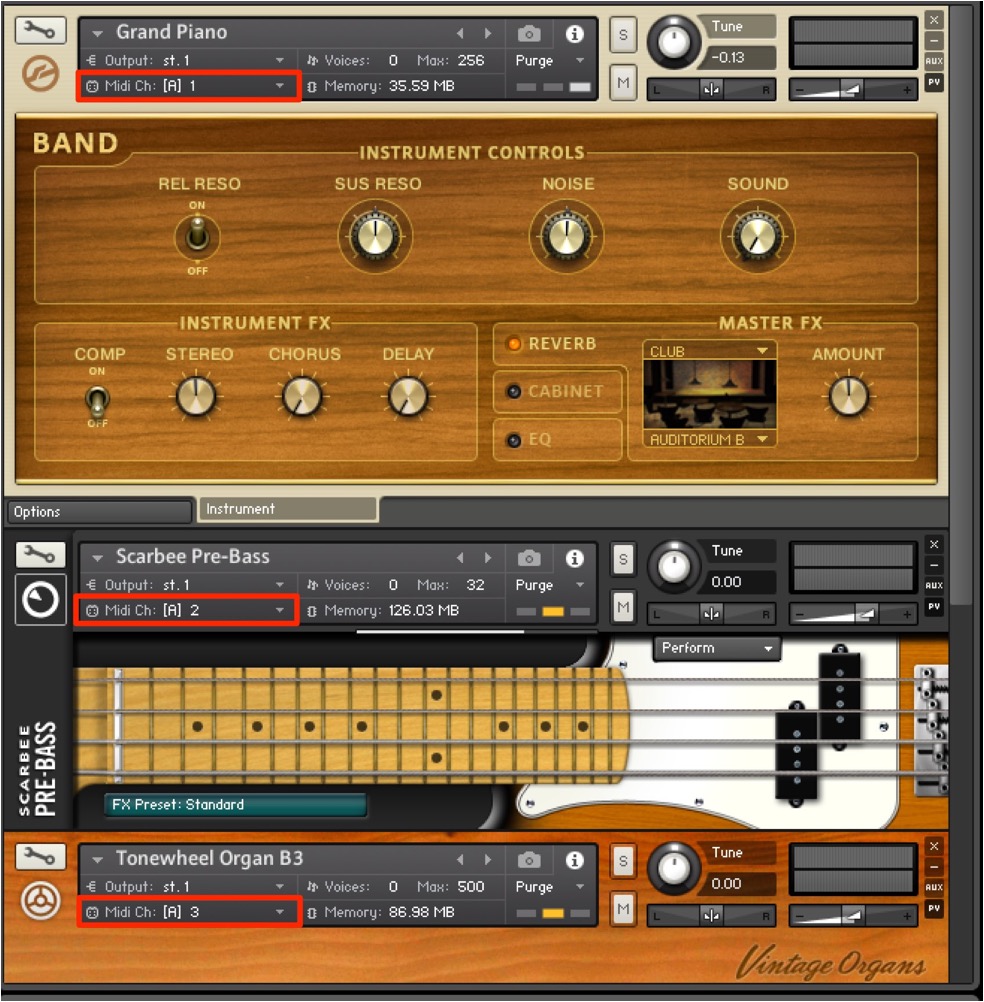
Load multiple sounds. Here, we loaded three instruments.
Kontakt can load up to 16 instruments per rack.
After loading, look at the area outlined in red.
These are called "MIDI channels," the numbers that control each instrument.
Assign a different MIDI channel to each instrument.
Normally this is set automatically.
If the channels here are the same,
instruments on the same channel will play at the same time.
That completes the setup on the software synth side.
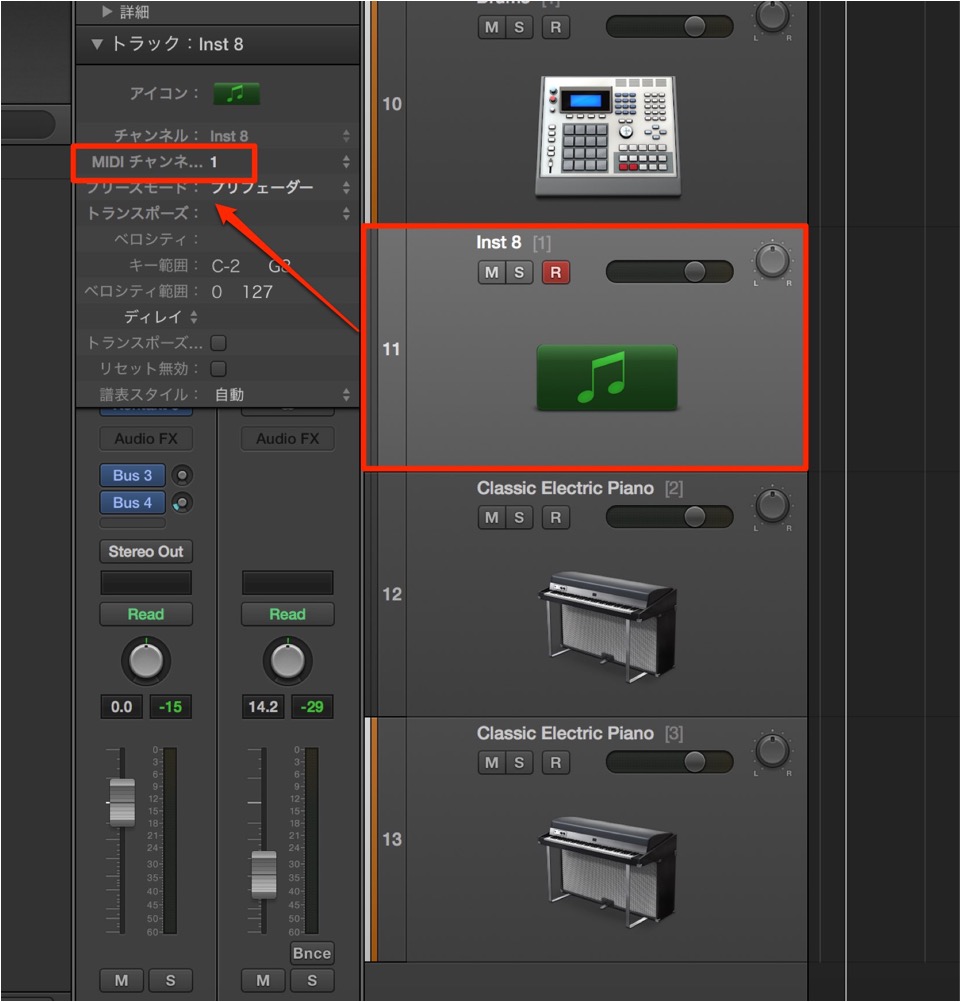
Set the MIDI channel in the area outlined in red in the track's Inspector
to match the instrument's MIDI channel in Kontakt.
You can now program each instrument from a single Kontakt.
This time we used "Kontakt,"
but you can also use this with commercial instruments such as "Trilian" and "Omnisphere."
What If You Want to Add Tracks Later?
Select the track where the instrument is loaded,
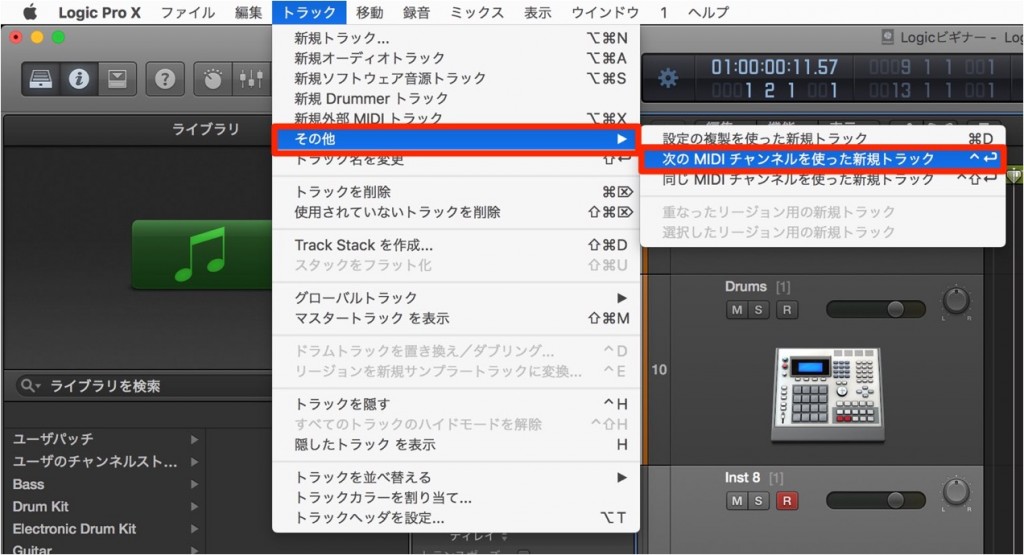
then choose "Track" → "Other" → "New Track with Next Channel" from the menu bar.
How to Use Multiple Sounds in One Software Synth in Logic 8/9
Here, we use the high-quality multitimbral instrument "Kontakt" as an example.
Of course, this method works with any software synth that can load multiple instruments.

↑ First, load the software synth on an instrument track as usual.

↑ Load multiple sounds. Here, we loaded three instruments.
Kontakt can load up to 16 instruments per rack.
After loading, look at the area outlined in red.
These are called "MIDI channels," the numbers that control each instrument.
If the channels here are the same,
instruments on the same channel will play at the same time.
So
assign a different MIDI channel to each instrument.
Normally this is set automatically.
That completes the setup on the software synth side.

↑ Next, select the Kontakt track
and press Track menu → "New with Next MIDI Channel."
Do this as many times as the number of instruments loaded in Kontakt.
Here, there are three instruments.

↑ Set the MIDI channel in the area outlined in red in the track's Inspector
to match the instrument's MIDI channel in Kontakt.
You can now program each instrument from a single Kontakt.
This time we used Kontakt,
but you can also use this with commercial instruments such as "Trilian" and "Omnisphere."
- Logic X
- Logic 8/9

Frequently asked questions
Q1. How should I set MIDI channels when using multiple sounds in one software synth?
It is important to assign a different MIDI channel to each instrument in Kontakt and match the same channel numbers in the track Inspector in Logic Pro. If the channels are the same, multiple instruments will play at once.
Q2. Can I run multiple sounds in software synths other than Kontakt?
Yes. The same method applies to software synths with multitimbral features, such as Trilian and Omnisphere. It works with any plugin that can load multiple instruments.
Q3. What are the specific benefits of reducing CPU usage?
The load is lighter than running multiple software synth instances, making it easier to produce more complex songs and add more plugins. It is especially effective for building a stable production environment on older computers.
Q4. Does the operation differ between Logic X and older versions?
Yes. Logic X uses "New Track with Next Channel," while older versions use "New with Next MIDI Channel," among other differences in the steps.
NEW ARTICLES
Latest English Articles











