
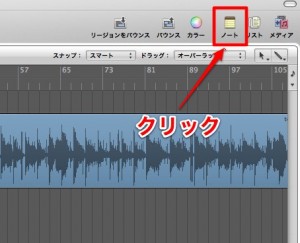
Using Logic Pro's Note Pad can greatly improve the efficiency of your music production. You can write notes not only for the whole project but also detailed notes for each individual track. In productions where you often check lyrics, the convenience of easily bringing in lyrics that already exist as text by copy and paste is especially useful. Just open the Note Pad from the notes icon and edit on the Project or Track tab to keep your lyrics and notes in one place, dramatically improving your productivity and organization.
Work While Checking Lyrics with Logic's Note Pad
In music production, you surprisingly often need to check the lyrics while you work.
In such cases, it is handy to write the lyrics into your Logic project.
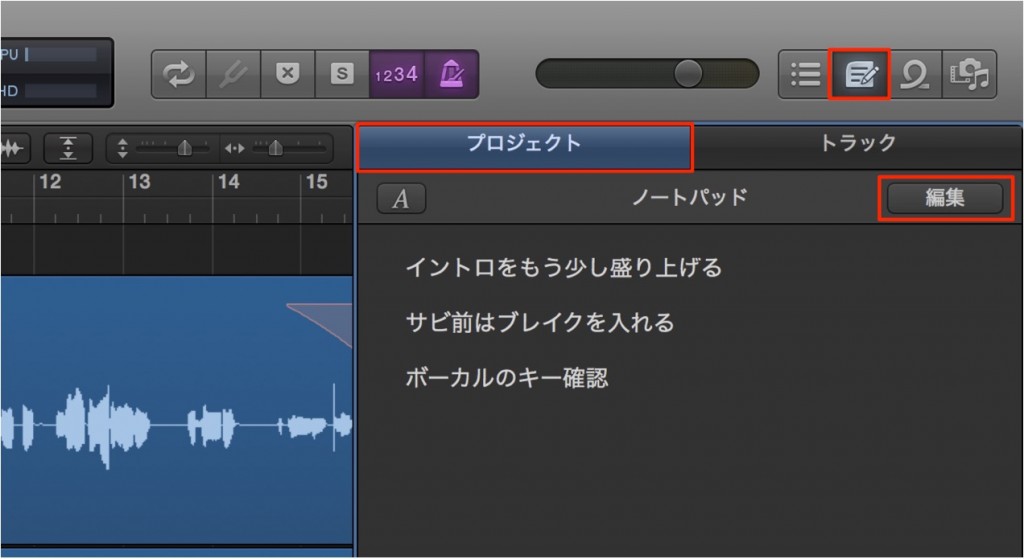
Click the notes icon to open the Note Pad.
The Project tab lets you write notes about the song.
Click "Edit" and type your text.
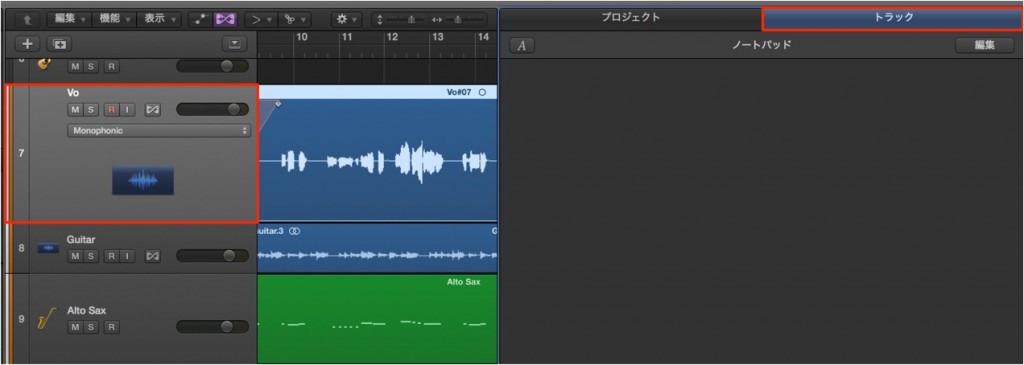
You can also write separate notes for each track.
Select the track you want to write notes for and write on the Track tab.
These days, many lyrics already exist as text in emails or on websites,
so it is convenient that you can bring them in easily by copy and paste.

Frequently asked questions
Q1. Where is Logic Pro's Note Pad?
Click the notes icon to open the Note Pad. Write notes for the whole project on the Project tab and notes for individual tracks on the Track tab.
Q2. Can I copy lyrics from elsewhere and paste them in?
Yes. You can easily bring lyrics that exist as text in emails or on websites into Logic's Note Pad by copy and paste.
Q3. What is the difference between notes on the Project tab and the Track tab?
The Project tab is for notes about the whole song, while the Track tab is for separate notes on each track. Using each as appropriate helps you stay organized.
NEW ARTICLES
Latest English Articles











