
The swing function built into Logic Pro's quantize feature is an important tool for adding a human groove and dynamics to programmed music. Aligning timing perfectly with quantize sounds mechanical, but applying swing (shuffle) at a modest value of around 53 to 58% lets you naturally express the triplet-based groove that is a staple of blues-style music. It can be applied to any instrument, not just drums, and adjusting it by ear can greatly improve the liveliness and expressiveness of the whole song.
Swing in the Quantize Function

A powerful ally for programming: quantize
It aligns a performance with off timing to exactly on the grid,
but perfectly exact timing is not always the best approach for a song.
- After applying quantize, the groove disappeared
- You programmed a part with the Pencil or step input, but the rhythm lacks dynamics
Situations like these:
hasn't everyone experienced them at least once?
In such cases, try using the swing function built into quantize!!
What Is Swing?
Also called "shuffle," it is a groove based on triplets. It is a staple of blues and similar styles!
(A typical beat without this bounce is called "straight.")
If you apply full swing as is, the rhythm bounces completely
and the pattern itself changes,
but applying just a little adds a human touch and dynamics.
Triplets / Swing Explained
It works fine not only on drums but on other instruments too.
- Logic X
- Logic 8/9
Logic X: How to Set Swing
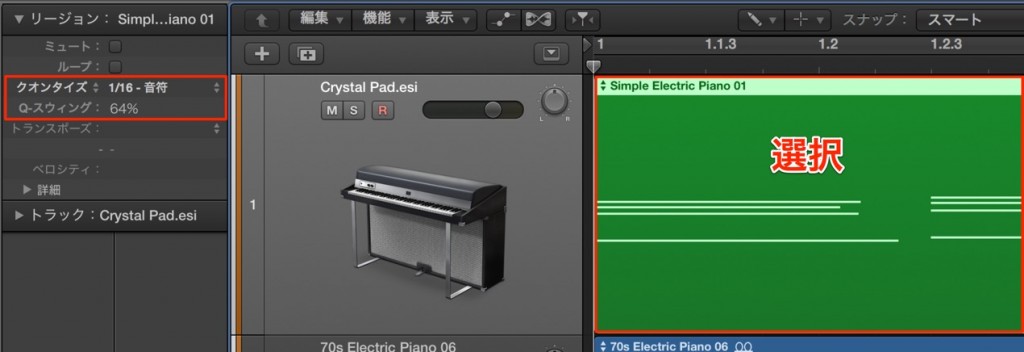
Select the region you want to apply swing to, then make the adjustment.
50% is straight. Since it becomes a full swing at around 65%,
try adjusting it between 53% and 58%.
We have given some reference values, but the right amount varies greatly depending on the song,
so try various values while checking with your ears.
Use swing to create songs with a great groove!!
Logic: How to Set Swing

↑ 50% is straight. Since it becomes a full swing at around 65%,
try adjusting it between 53% and 58%.
We have given some reference values, but the right amount varies greatly depending on the song,
so try various values while checking with your ears.
Use swing to create songs with a great groove!!
- Logic X
- Logic 8/9

Frequently asked questions
Q1. What is the difference between swing and straight in Logic Pro?
Straight, at 50%, is perfectly exact timing, while swing (shuffle) is a human, triplet-based groove. Applying strong swing changes the rhythm pattern itself, so you normally adjust it with a modest value of 53 to 58%.
Q2. Can I use the swing function on instruments other than drums?
Yes. It can be applied to any instrument, not only drums but also bass, guitar, piano, and more. Adjusting the value for each track individually according to the song's genre and character creates a consistent groove.
Q3. How should I decide the best swing value?
50% is straight and 65% or more swings too much, so start by trying 53 to 58%. Then it is important to fine-tune it while actually listening, to match the mood of the song.
NEW ARTICLES
Latest English Articles











