
FL Studio's Randomize function is an important feature that adds human performance nuance to programmed parts by intentionally introducing variation into MIDI parameters such as pitch, velocity and pan. This article explains how to apply it to repeated patterns such as hi-hats, so you can learn practical techniques for creating natural, expressive beats while avoiding the lifeless sound known as the "machine gun".
Add variation to any MIDI parameter
The "Swing function" in the previous section created a groove by making the rhythm bounce,
but another function we would like to introduce is "Randomize".
By adding variation to pitch and velocity, you can give a performance a human feel,
and avoid the lifeless repeated hits known as the "machine gun".
Randomize tutorial video
Of course, you can set up randomize in FL Studio too.
How to apply randomize
Here we will apply randomize to a hi-hat with the following pattern.

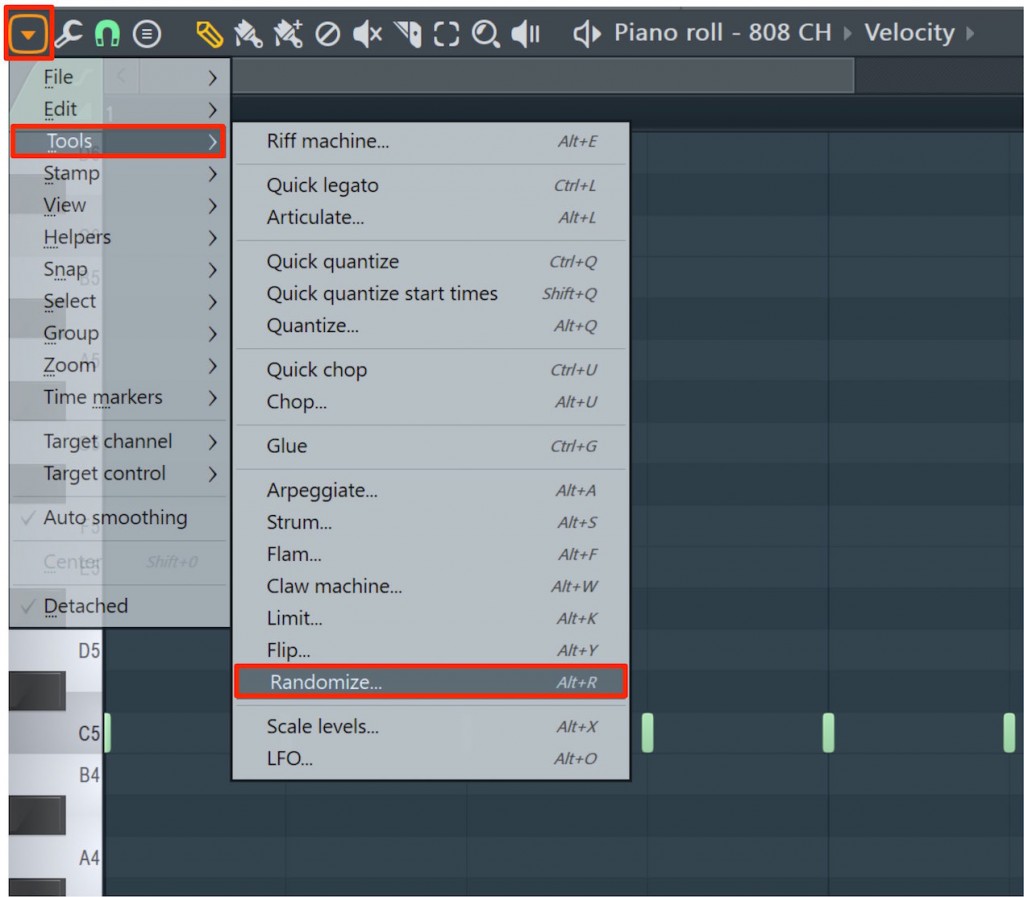
Open the hi-hat in the Piano roll and click the icon at the top left.
Select "Tools" → "Randomize" in it.

In this case we do not want to change the pitch, so turn off "Pattern" (unlit),
and turn on "Levels" (lit).
Moving each knob left or right from the center changes the direction and range of the randomization.
The key to randomizing is to keep it subtle.
Here we changed "PAN", "VEL" and "PITCH" only slightly.
When you have finished the settings, press "Accept" to confirm the values.
This alone adds performance nuance and makes it sound much more natural.

Frequently Asked Questions
Q1. Which MIDI parameters can FL Studio's randomize be applied to?
Randomize supports several parameters, including pitch (PITCH), velocity (VEL), pan (PAN) and pattern. You can turn each item on or off as needed and adjust its range.
Q2. What should I keep in mind when applying randomize?
It is important to keep the effect of randomize subtle. Moving the knobs a lot sounds unnatural, so keeping the changes small lets you express a natural human feel without spoiling the groove.
Q3. How do I apply the values after setting up randomize?
Click the "Accept" button at the bottom of the settings panel to confirm the randomize values and apply them to the MIDI data.
NEW ARTICLES
Latest English Articles











