
ReWire, which synchronizes Cubase with other DAWs such as Reason, can greatly improve the efficiency of DTM production. With ReWire, you can select sounds directly from external software that automatically follows Cubase's playback and stop, and do all your programming in one place within Cubase. However, the session information is not saved automatically, so you need to save Reason's state separately when you finish working. Understanding this setup and these precautions lets you build an advanced production environment that makes use of multiple synthesizers and plug-ins.
Synchronize Other Software with Cubase

With ReWire, you can synchronize a different sequencer with Cubase.
Besides following Cubase's playback and stop, the other sequencer can be programmed from within Cubase, which makes your work easier.
Well-known examples include Reason and FL Studio.
Here we explain using Reason, but the setup is basically the same for any software.
Cubase: How to Set Up ReWire
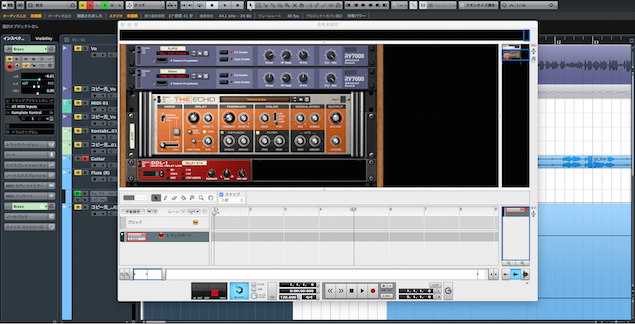
↑ Launch Cubase first, then launch Reason.
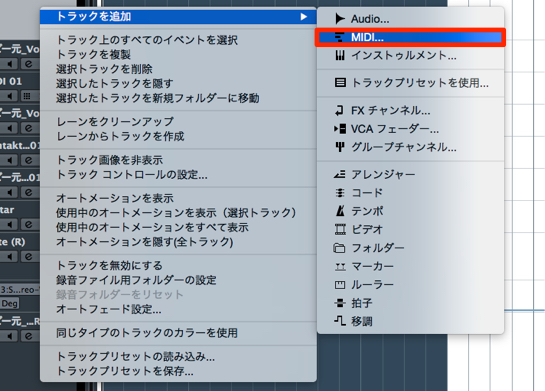
↑ Create a MIDI track.
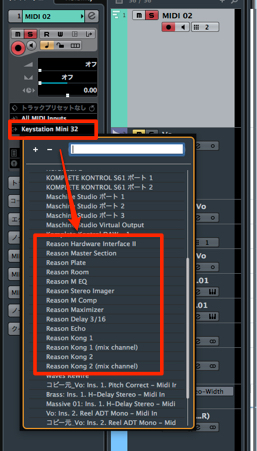
↑ Reason's sounds appear in the MIDI output, outlined in red.
Select the sound you like from here.
*If you add a sound in Reason at this point, it is immediately reflected in Cubase's MIDI output.
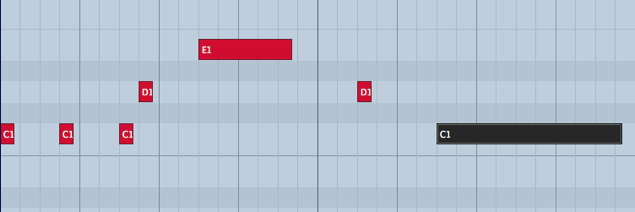
↑ After that, just program in Cubase as usual.
Reason automatically follows Cubase's playback and stop.
Notes on ReWire
The Cubase file does not store ReWire sound or synth information.
When you finish working, you need to save the ReWire state separately.

↑ When you try to close Reason, the screen below appears.
Save Reason's state to any location you like.
To Continue Working Later
- 1_Open the Cubase session
- 2_Launch Reason; it starts in its initial state.
Then open the file you saved in the image above
This fully restores the previous state so you can continue working.
Frequently asked questions
Q1. What are the benefits of using ReWire?
You can use multiple DAWs and synths in sync, and they automatically follow Cubase's playback and stop. Because everything is managed in one place within Cubase, there is no need for complicated external operations, making production more efficient.
Q2. What should I do if ReWire gives an error?
The order matters: launch Cubase first, then launch Reason. We also recommend checking the compatibility of the latest versions of both programs and updating as needed.
Q3. Are ReWire settings carried over to other sessions?
No. Session information is not saved in the Cubase file. To continue working, you need to save Reason's state manually each time and open it again in the next session.
NEW ARTICLES
Latest English Articles











