
Cubase's time stretch function is an essential feature for quickly fixing audio files imported into your DAW that do not match the song's tempo. Just drag the lower-right corner of an audio event such as a drum loop or sound effect to freely adjust its length and match it perfectly to the song's tempo. It works for both lengthening and shortening, greatly increasing your freedom in arranging, making it an important technique that directly boosts both efficiency and creativity.
Fit Audio Files That Don't Match the Song's Tempo
For example, you find a cool one-bar drum loop and import it into your DAW,
but the loop's tempo does not match the song's, so they drift apart.
That is when the time stretch function comes in.
Arranging with Time Stretch
Cubase: How to Use Time Stretch
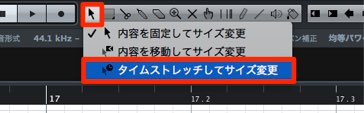
Press and hold the Object Selection tool to display a menu.
Choose "Sizing Applies Time Stretch."
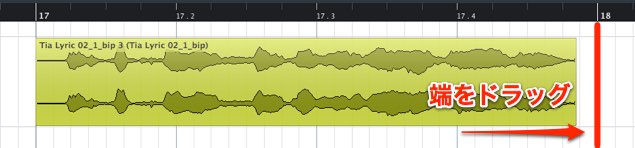
Drag the lower-right corner of the event to the desired position.
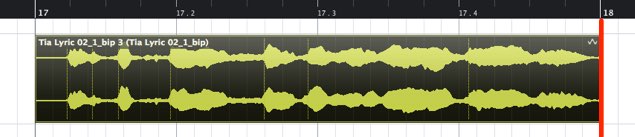
It now matches the tempo.
This time we lengthened the audio to match the tempo, but you can of course shorten it too.
With this method, you can also change sound effects to the length you want.
There are many ways to use it, so bring it into your production and use audio freely!
Frequently asked questions
Q1. What is the difference between time stretch and AudioWarp?
Time stretch changes the length of an entire event, while AudioWarp makes audio follow the tempo automatically when the song tempo changes. Both are tools for fitting audio to the tempo, used according to the purpose.
Q2. Does time stretching degrade audio quality?
Cubase's time stretch uses an advanced algorithm, so degradation is minimal when used appropriately. However, stretching or shrinking audio to an extreme degree may affect the sound quality.
Q3. Can it be used on things other than drum loops?
Yes. It can be applied to any audio file, such as sound effects, vocals, and instrument sounds. It increases your creative freedom and can be used in many situations.
NEW ARTICLES
Latest English Articles











