
The license authorization required to use Waves products can run into trouble when you change your computer or hard drive. This article explains in detail how to solve the problem when a license remains on an old device because of a hard disk failure or a lost license storage device and can't be authorized in your new environment. Using the "Recover Licenses" function of Waves' license management tool "WLC" lets you easily recover and move licenses so you can authorize them on a new computer. It gives you a practical solution to a problem commonly faced when setting up a production environment.
Problems that occur when you change your computer or HDD
Waves products must be authorized before you can use them.

With the "WLC" application,
you download licenses to your computer.
However,
- The hard disk broke beyond repair
- You erased the HDD that held the licenses
- You lost the USB stick that held the licenses
in cases like these,
the Waves licenses remain assigned to that computer.
As a result, you can't authorize them on a new HDD or computer.
This time, we explain how to solve this.
Recovering licenses
First, launch "WLC."
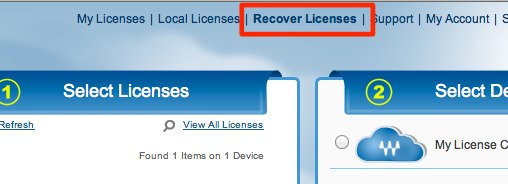
Select "Recover Licenses."
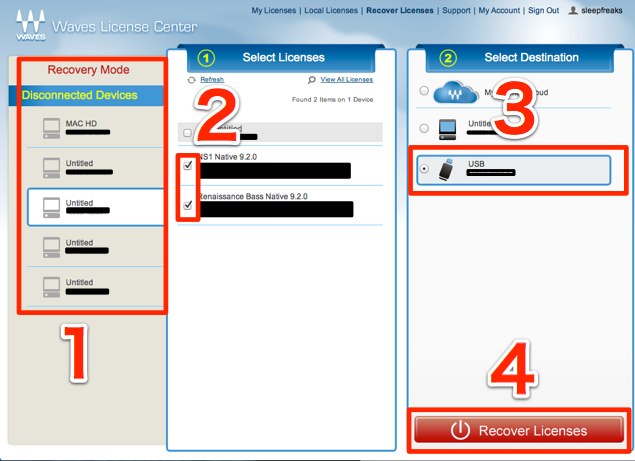
- 1. Select the computer that holds the licenses
- 2. Check the products
- 3. Select which device to move the licenses back to
- 4. Confirm the above and click
The licenses are now released from the original computer
and can be authorized on the new computer.
For license authorization, see the video below.
Waves license authorization
Frequently asked questions
Q1. Why can't I use my Waves licenses after changing computers?
Waves licenses are tied to the computer where they were authorized. If the HDD fails, is initialized, or the license storage device is lost, the license stays on the old computer, so you can't authorize it in the new environment.
Q2. What does the "Recover Licenses" function do?
It is a tool that releases Waves licenses left on an old device and moves them to another device, such as a new computer or a USB stick. You can do it easily in four steps.
Q3. Does recovering licenses require online authorization?
The article doesn't go into detail, but license operations for Waves products generally require an internet connection. Check Waves' official support for details.
NEW ARTICLES
Latest English Articles











