
The main cause of Cubase producing no sound is an incorrect sound device setup. This article walks through the solution step by step, from selecting your audio device in Device Setup to assigning outputs in VST Connections. Following these steps solves most playback problems and gets your production environment running smoothly again. You can also learn about related Cubase troubleshooting, such as MIDI keyboard recognition and resetting the preference files.
Adjusting your sound device
Cubase won't play any sound: a hopeless situation...
Here's how to solve it.
In most cases, the problem is in the sound device settings.
Solution
Selected questions and answers from the YouTube video

Hello. When I select my interface for the ASIO driver and press the OK button, Cubase freezes. What am I doing wrong? My interface is the TASCAM US-2x2.

I own that product too, but I've never had that symptom. Please check the following: update Cubase to the latest version, and if you're connecting through a USB hub, connect directly to your computer instead.
I'm using Cubase Pro 10.5. The meters next to the track and at the bottom right move, and MIDI tracks make sound, but for some reason instrument tracks make no sound. Why is that?...
Instrument tracks are used by loading a software instrument, so if no software instrument is assigned to the track, there will be no sound at all.
Hello, I have a question. I'm currently using the Cubase Elements 10 trial. I followed the settings in this video, but no sound came out of my headphones. I don't have an audio interface; as in the video, I set the ASIO driver to Generic Low Latency ASIO Driver, and the audio connections weren't set to "Not Connected." I checked the sound using an instrument, but the meter didn't move. I'm using a USB headset; could the headset be the problem? I'd really appreciate your advice. I look forward to your reply. Thank you.
Even if there's a problem with the audio routing, the meter for an instrument would still respond. So it seems something is wrong with the instrument track's sound source. As a test, try dragging and dropping an audio file such as an MP3 onto the Cubase timeline and check whether it makes sound.
After drawing a note, I used to be able to drag it up and down and freely change the pitch from where I drew it until I dropped it, but suddenly I can't anymore. Did I change some setting...? Could someone knowledgeable please help me out...
If the button shown in the image is turned off in the MIDI editor, no sound plays while editing. https://app.box.com/s/2agsc0utbqs76jo3098jff9qs3kbq6bh Please check this.
Nope, I don't get it at all lol. On the left is News and Tutorials, on the right is Projects: Recent, Recording, Scoring, Production, Mastering, Other... From that screen, where do I go to get to Devices? lol
In the current version of Cubase, "Devices" has been renamed "Studio." So you can access the audio settings via "Studio" → "Studio Setup." On the startup screen when you launch Cubase, select "Other" → "Empty." We're currently creating content for the latest version.
The name appears under the ASIO driver, but at some point the connection drops. I just bought it, so I don't think there's a problem with the cables...
Is an error message displayed when it cuts out? If the sound crackles and drops out, the buffer size is very likely the cause.
I've set the ASIO driver in VST Audio System to my interface, and the inputs and outputs in Audio Connections are set to my interface too, but there's no sound. Is there any other setting I need to change? By the way, I'm also using a MIDI keyboard, and the keyboard is responding. I'm using Cubase Pro 10. Please reply.
Your settings look correct to me. Please check that the headphone volume and output volume on your audio interface aren't turned down, and if there's no problem there, please contact the manufacturer.
There's no Devices menu next to the Transport in the first place, so I'm stuck. What should I do?
Since Cubase 9.5, it's been renamed "Studio." Selecting "Studio Setup" from "Studio" opens the same window shown in the explanation.
There's no Devices in the top menu... What should I do?
Since Cubase 9.5, it's been renamed "Studio." Please check there.
I have a question. I'm using a Yamaha Steinberg UR22 as the audio interface with Cubase Elements 8. I mainly record guitar, and on the UR22 the red light sometimes flashes for an instant when the level goes over the peak line, but nothing abnormal shows in Cubase. I've left it alone thinking it's fine if Cubase shows no problem, but should I set the level so it never goes over the peak line on the UR22 even for an instant? Or if Cubase doesn't detect it, can I keep working as is? Please let me know.
You should absolutely avoid clipping inside the audio interface. A small amount may be inaudible, but the sound is still degraded. Even if you lower the volume in Cubase, the clipping remains in the data.
Do you have a playlist of Studio One tutorials??
Here is the Studio One playlist. https://www.youtube.com/playlist?list=PL53836339204520C2 We also publish articles on our website. Beginner articles: https://sleepfreaks-dtm.com/category/for-beginner-studioone/ Advanced articles: https://sleepfreaks-dtm.com/category/for-advance-studioone/ Thank you for your continued support.
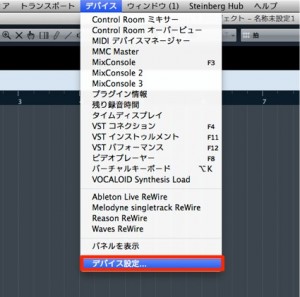
From the top menu, select "Devices" → "Device Setup."
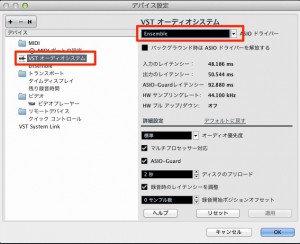
Under "VST Audio System," select your "audio device."
If there's still no sound,
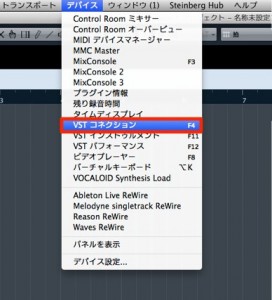
select "Devices" → "VST Connections" from the top menu.
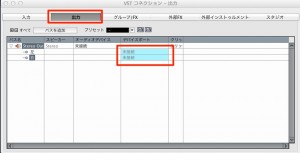
Select "Outputs" in the window.
Assign the part that says "Not Connected"
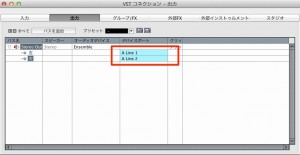
to your device's output.
Frequently asked questions
Q1. What should I check first when Cubase produces no sound?
First, open "Device Setup" from the "Devices" menu and check that the "audio device" in VST Audio System is selected correctly. In many cases, this not being set is the cause.
Q2. What should I do if VST Connections shows "Not Connected"?
From "Devices" → "VST Connections," select the "Outputs" tab and assign the part that's not connected to the output of your audio device. This enables audio output.
Q3. What should I do if there's still no sound after setting up the device?
We recommend installing the latest driver for your audio device or resetting Cubase's preference files to clear up any problems. If that still doesn't help, check the sample rate setting.
NEW ARTICLES
Latest English Articles











