
In Cubase, problems such as missing sound or noise during Export Audio Mixdown are mainly caused by insufficient CPU processing power. To solve this, change the export mode to "Realtime Export" to give processing more headroom. This article introduces the specific fix, giving Cubase users a practical solution for exporting audio files reliably.
Tracks don't play in the exported file, noise gets in, and more
When exporting a song you've produced, you use "Export Audio Mixdown."
When you do this,
tracks that should play may be silent, or noise may get in.
Such problems can occur.
This time, we introduce how to deal with them.
Solution
This symptom is caused by the computer's CPU not keeping up with the export processing.
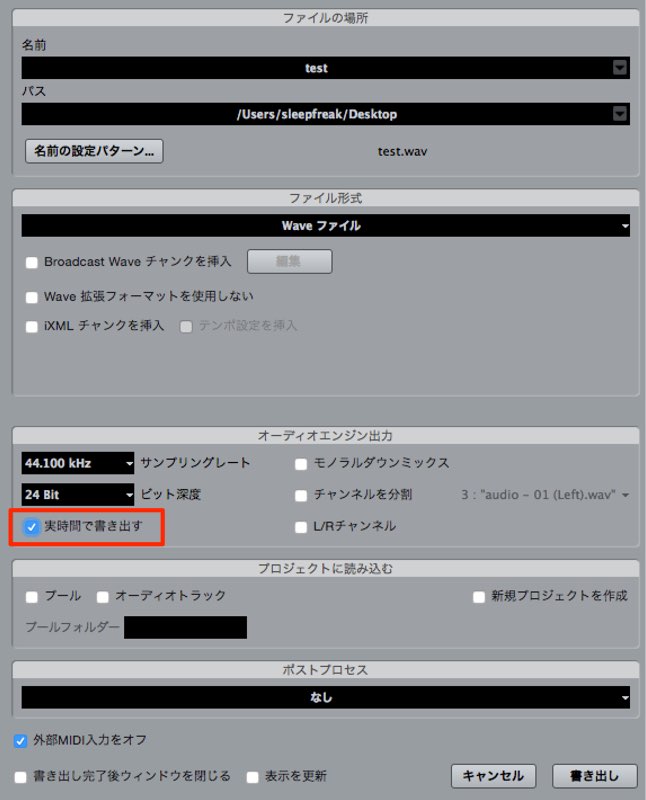
Change the export mode of Export Audio Mixdown to "Realtime Export."
The song is exported over its actual running time, giving processing more headroom.
If problems occur in your exported files, be sure to try this.
Frequently asked questions
Q1. Why is there no sound in a file exported from Cubase?
It is caused by the computer's CPU not keeping up with the export processing. Changing the export mode to "Realtime Export" improves this.
Q2. What is the benefit of switching to "Realtime Export"?
The song is exported over its actual length, giving the CPU more headroom. This prevents noise and audio dropouts.
Q3. If noise appears during Export Audio Mixdown, are there other possible causes?
CPU usage may be high. We recommend also considering methods such as disabling unnecessary plug-ins or reducing the number of tracks.
NEW ARTICLES
Latest English Articles











