
When using Session Guitarist in Cubase, the parameter values you set may reset to their defaults every time you start or stop playback. This problem can be solved easily by unchecking "Reset on Stop" on the MIDI tab in Preferences. Changing this setting lets you start and stop playback repeatedly while keeping your guitar tone and effect settings during production, greatly improving efficiency.
Session Guitarist values return to their defaults

While editing in Cubase, values return to their defaults when you start or stop playback...
Here is how to solve it.
Solution

This is the area that gets reset.

From the top menu, select "Preferences."
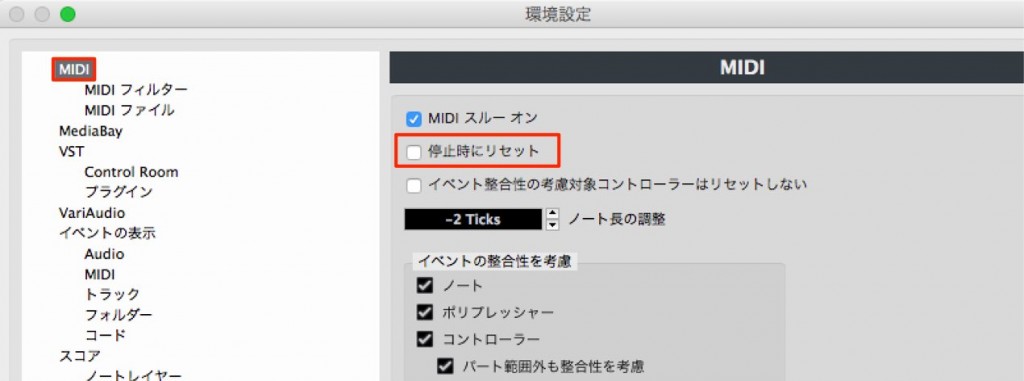
On the MIDI tab, find "Reset on Stop"
and uncheck it.
Now the values you set are kept even when you start and stop playback.
Frequently asked questions
Q1. Why do Session Guitarist's settings get reset?
Because the "Reset on Stop" function in Cubase's Preferences is enabled. This setting returns parameters to their defaults when playback stops, so unchecking it solves the problem.
Q2. Where is "Reset on Stop" in Preferences?
Select "Preferences" from Cubase's top menu and open the MIDI tab to see the "Reset on Stop" item. Uncheck this box.
Q3. Can the same problem occur with plug-ins other than Session Guitarist?
Yes. This setting applies to all of Cubase, so parameter values in other soft synths may be reset in the same way. The same solution works.
NEW ARTICLES
Latest English Articles











