
Logic Pro X is a 64-bit DAW that uses AU-format plug-ins. If plug-ins you used in Logic 9 or earlier don't appear in Logic Pro X, the cause is that you're using 32-bit versions of the plug-ins. To fix this, download the latest 64-bit installer from the manufacturer's site, update the plug-ins, and reinstall them. Doing this lets Logic Pro X recognize the plug-ins correctly so you can use them.
Additional plug-ins used in Logic 9 or earlier don't appear in Logic Pro X
Continuing from the previous article, "Additional Plug-ins Crash,",
we explain why plug-ins don't load.
Solution
To use plug-ins in Logic Pro X, they must be fully 64-bit compatible.
So update your plug-ins to the 64-bit versions.
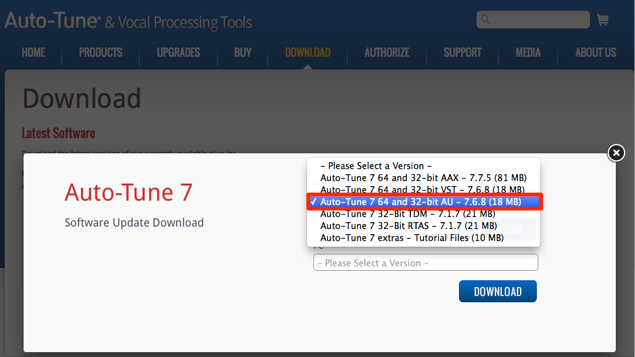
Go to the manufacturer's site to get the latest installer.
In most cases it is labeled "64-bit," so select and download it.
Also, Logic's plug-in format is called "AU".
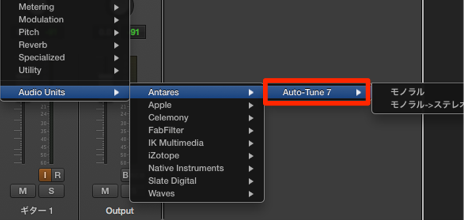
Then simply install it,
and the plug-in will be 64-bit compatible and recognized by Logic Pro X.
Frequently asked questions
Q1. Why don't installed plug-ins appear in Logic Pro X?
Logic Pro X requires full 64-bit compatibility. 32-bit plug-ins from Logic 9 or earlier won't be recognized as they are. Download the 64-bit versions of the plug-ins from the manufacturer's site and install the update.
Q2. I downloaded the plug-in labeled "64-bit." What should I do next?
Run the downloaded installer and complete the installation. After installing, launch Logic Pro X, and the plug-in will be recognized automatically and ready to use.
Q3. Which plug-in format does Logic Pro X support?
Logic Pro X supports AU-format plug-ins. When choosing plug-ins, you need ones that are AU format and 64-bit compatible.
NEW ARTICLES
Latest English Articles











