
When installing music production software on a Mac, OS 10.8 and later security settings can block the installation. This article explains the system security settings that cause this and how to solve it. Simply changing the setting in "Security & Privacy" in System Preferences to allow apps from anywhere lets you install purchased plugins and DAW-related software normally. It's a practical troubleshooting guide for Mac users of all levels who get stuck setting up their production environment.
Security settings in OS 10.8 and later
When you try to install software you purchased, you see

this rejection message.
It's quite a shock.
You can solve this by changing the system security settings.
Solution
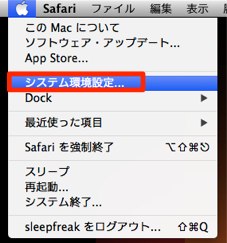
From the Apple menu, select "System Preferences."

Select "Security & Privacy."

Select the "General" tab, unlock the lock icon,
and select "Anywhere" under allowed apps.
Now you can proceed with the installation without problems.
Frequently asked questions
Q1. Why can't I install software on Mac OS 10.8 or later?
Because of the stronger security settings Apple introduced, installation of unidentified applications is blocked by default. You can solve this by changing the setting in System Preferences to allow apps from anywhere.
Q2. I can't unlock "Security & Privacy."
Click the lock icon and enter the administrator password. After the password is accepted, the option to allow apps from anywhere becomes available.
Q3. Does changing this setting increase security risks?
Basically, there's no problem as long as you only install trusted software. However, if security is a priority, we recommend changing the setting back after installing.
NEW ARTICLES
Latest English Articles











