
The Waves installer failing to launch on Mac 10.9 is a common problem for music producers. This article introduces a solution using the separate installer that includes all plugins, available on the official download page, as an alternative when the standard version fails. It also covers what to do if the installation fails because of security settings, giving you practical steps to reliably install Waves on a Mac.
Installation error on Mac 10.9

The installer used to install "Waves."
An error that prevents this installer from launching occurs on Mac 10.9. (As of November 30, 2013)
Here we'll explain how to deal with it.
Solution
Go to the Waves download page.
URL: http://www.waves.com/downloads/v9
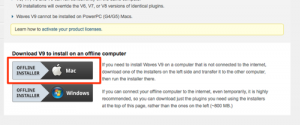
Instead of the standard installer,
download the installer at the very bottom of the page.
This one includes all the plugins,
so the download takes quite a long time.
When it finishes, install as usual.
For installation steps, see the middle of the following article.
URL: https://sleepfreaks-dtm.com/mix-trouble/renaissance-bass/
What if you still can't install with the method above?
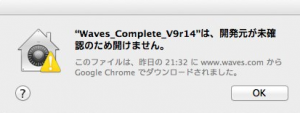
It may be a security issue.
You can fix it with the following article.
URL: https://sleepfreaks-dtm.com/dtm-trouble/mac-install/
Frequently asked questions
Q1. Why won't the Waves installer launch on Mac 10.9?
The main cause is that the standard installer doesn't support Mac 10.9. You can solve this by using the installer with all plugins included, located at the bottom of the official download page.
Q2. Why does the Waves download take so long?
The recommended installer includes every Waves plugin, so the file is large and the download takes quite a while.
Q3. What should I do if I still get an error after installing?
Security settings may be the cause. In most cases, checking and adjusting the security settings on your Mac will solve the problem.
NEW ARTICLES
Latest English Articles











