
This article introduces an efficient way to avoid the tedious reinstallation of sound libraries when you reinstall your computer. By copying your sound libraries to an external HDD, installing only the software on the new system, and loading the sounds from the external HDD, you can cut installation time dramatically. This method also helps reduce the load on your system HDD and serves as a data backup, and it's a practical technique you can use when you buy a new computer too.
Skip the time-consuming installation
Today's software synths simply sound great.
Because of that, they're large and take a long time to install.
The first installation can't be helped, but when you reinstall your computer,
just thinking about doing that all over again might make some people want to quit music production.
When reinstalling, you don't need to install the sound libraries again.
There's a way to skip this work, which could be called a waste of time.
You can also use it with a newly purchased computer.
Prepare an external or separate HDD
For this procedure,
you need one more HDD besides the system HDD you're reinstalling.
Besides this purpose, it can also be used for "data backup",
so if you don't have one, it's worth owning one.
Actually, please do get one.
Connections include "USB 2/3" and "FireWire," so
be sure to buy one that matches your computer.
You can also load sounds directly from this HDD.
You can use software synths without filling up your system HDD as well.
Copy the sounds to the external or separate HDD
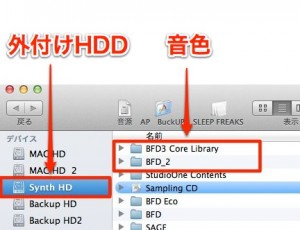
Copy your sound libraries to the external drive like this.
If you're already loading sounds from an external drive, this step isn't necessary.
Install only the software
Software synths let you install the software and the sound library
separately.
So on the new computer, proceed without installing the sound libraries.
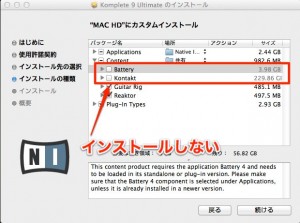
"Example: Native Instruments Komplete"
This makes the installation far faster than usual.
Link the sounds
Every piece of software has a screen where you specify the sounds,
or a point where it asks you where the sounds are.
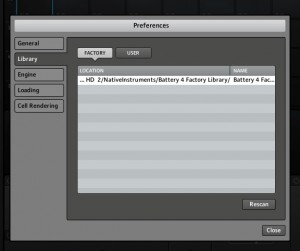
At that point, specify the location on the external HDD you copied to above, and the sounds will be loaded.
Frequently asked questions
Q1. Do I need to install the sound libraries every time I reinstall my computer?
No. If you copy the sound libraries to an external HDD beforehand, you just install the software on the new system and load the sounds from the external HDD.
Q2. Does loading sounds directly from an external HDD solve the problem of a full system HDD?
Yes. Loading directly from an external HDD lets you use software synths without using system HDD space. You can make use of large sound libraries even on a computer with limited storage.
Q3. If I'm already loading sounds from an external HDD, do I need to copy them again?
No. In that case there's no need to copy the sound libraries again. After installing the software on the new computer, just specify the same location on the external HDD and the sounds will load.
NEW ARTICLES
Latest English Articles











