
Studio One Free is a popular DAW you can use at no cost, but sometimes the free sound content that comes with it can't be downloaded. You can solve this by changing the launch mode to the DEMO version, completing a new account registration, and then installing the content. After that, switch to the free version to keep using Studio One Free with the sounds you downloaded. Following the right steps lets you set up your production environment smoothly.
A problem that crops up in the Free version
The popular free version, "Studio One Free",
sometimes can't download the "free sound content" you can use in the software.
Here we'll explain how to fix this.
Solution

At launch, start in the "DEMO version" instead of the "free version."
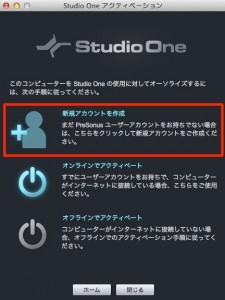
Create a new account.

After completing user registration,
select "Studio One" → "Studio One Installation" from the top menu.

Select "Install content from user account," outlined in red.
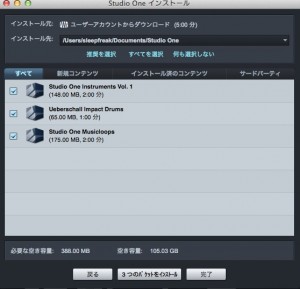
Download the content.

After that,
select "Studio One" → "Studio One Activation" from the top menu.
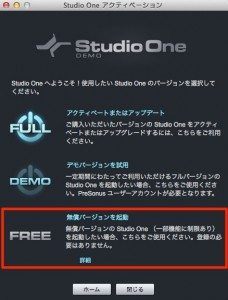
Select the free version and continue using Studio One Free.
Frequently asked questions
Q1. Why can't I download the free content in Studio One Free?
The cause is launching in the free version. You can solve it by launching in the DEMO version, completing account registration, and then installing the content.
Q2. What's the difference between the DEMO version and the Free version?
The DEMO version is a mode that gives you access to content downloads, letting you install content after registering an account. Afterward, you switch to the free version for normal use.
Q3. What do I do after downloading the content?
Once the content is installed, select the free version from "Studio One Activation" in the top menu, and you can start using Studio One Free.
NEW ARTICLES
Latest English Articles











