
This article explains how to fix Cubase launching in 32-bit mode on a Mac. In 32-bit, your computer's memory can't be fully used, so if your system supports 64-bit, launching in 64-bit is recommended. You'll learn that you can launch in 64-bit with a simple procedure: right-click the Cubase application in the Applications folder, select "Get Info," and uncheck "Open in 32-bit mode." Just relaunch Cubase after changing the setting to produce music with higher performance.
Launch Cubase in 64-bit

This is how to deal with Cubase launching
as 32-bit instead of 64-bit.
In 32-bit, your computer's memory can't be fully used.
If you can launch it in 64-bit, we recommend changing the setting.
Solution
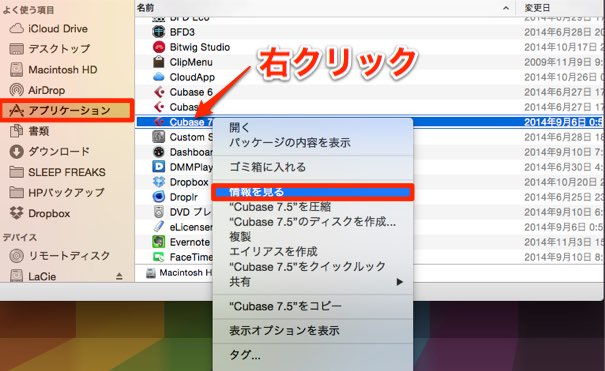
Right-click the "Cubase application" in "Applications."
Select "Get Info" from the menu.
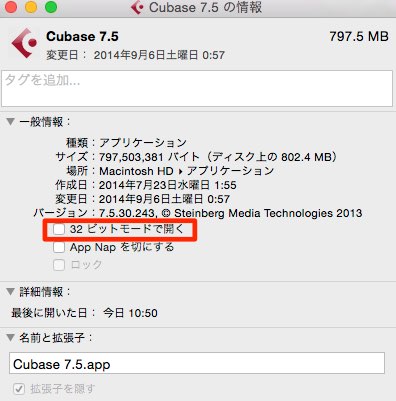
Uncheck "Open in 32-bit mode,"
then launch Cubase again, and it will start as "64-bit."
Frequently asked questions
Q1. Why does Cubase launch in 32-bit on my Mac?
Because "Open in 32-bit mode" is checked. This is a compatibility setting, but if your system supports 64-bit, unchecking it lets you launch in 64-bit.
Q2. What is the difference between 32-bit and 64-bit?
64-bit can use more of your computer's memory, improving performance with large projects and many plug-ins. 32-bit is limited in memory use, so it is inferior in stability and processing power.
Q3. Can Cubase be launched in 64-bit on every Mac?
It is possible if your OS and version of Cubase support 64-bit. Older Macs or systems may support only 32-bit. We recommend checking the specifications in advance.
NEW ARTICLES
Latest English Articles











