

When mastering songs in Studio One, you first apply different insert effects to each track to adjust loudness and sound quality, then set common effects such as EQ, compression, and a limiter on the master section to achieve consistency across all the songs. Adjusting mastering effects is difficult, so it is effective to learn by trial and error with presets. Accurate mastering lets you aim for professional sound quality.
Applying Insert Effects to Songs in Studio One
Here, we adjust the loudness and sound quality of the songs relative to each other.
You can use different insert effects on each song.
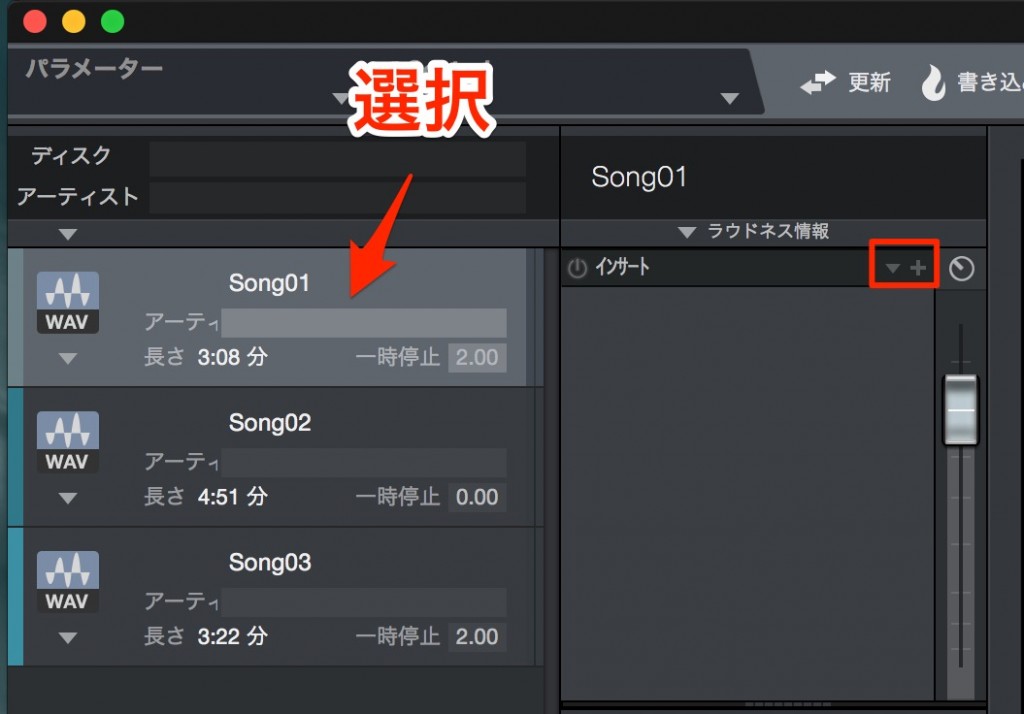
↑ Select the song you want to apply an insert to,
and add effects with the "+" outlined in red.

↑ The "inverted triangle icon" to its left lets you choose presets.
Adjusting mastering effects is quite difficult,
so we recommend trying various presets to learn.

↑ Applying effects to the master section
applies the same effects to all the songs.
Apply effects to each song individually,
and use EQ, compression, a limiter, and so on in this master section
to create consistency across all the songs.

Frequently asked questions
Q1. In Studio One mastering, what is the difference between insert effects and master effects?
Insert effects are individual processing applied to each track, while master effects are set on the master channel and apply to all the songs. Combining individual adjustments with overall processing makes for effective mastering.
Q2. How should mastering beginners learn to adjust effects?
We recommend listening to the various presets included with Studio One and learning by checking the changes by ear. Comparing different genres and presets helps you understand what each effect does in practice.
Q3. What are the roles of the main effects used in mastering?
EQ adjusts the frequency balance, compression controls volume fluctuations, and the limiter raises loudness and limits peaks. Combining these three produces a balanced, high-quality master.
NEW ARTICLES
Latest English Articles











