
Songdrop is a must-have tool that lets you pick favorite songs from websites such as YouTube and SoundCloud to create and manage your own library. After registering an account, you can easily add songs with the search function or the Chrome extension and create multiple playlists by genre or taste. You can embed and share your playlists on blogs, websites, and social media, and reorder or edit songs intuitively by dragging, greatly improving the efficiency of music production and curation.
Amazingly smooth song management
A tool that's now a must for musicians and creators: a service that lets you pick favorite songs from websites
such as YouTube and SoundCloud and manage them.

"Songdrop"
https://songdrop.com/
By adding songs you like one after another,
you can easily create, listen to, and publish your own library.
It's so easy and convenient to use
that it might change the way you listen to music.
From creating an account to adding songs
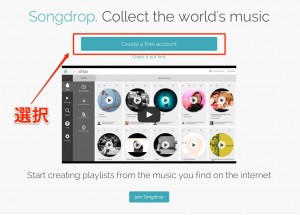
First, select "Create a free account" and register.
You can also log in with Facebook.
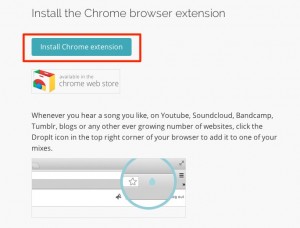
We recommend Chrome as your web browser.
By installing the extension,
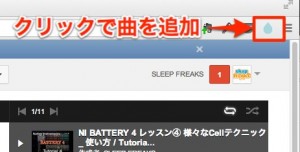
you can easily add songs you like.
You can also add songs with the following steps.
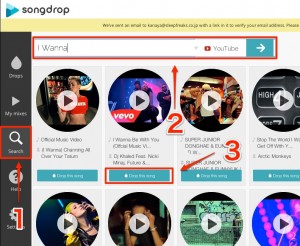
- 1_Select "Search"
- 2_Enter the artist or song name you're looking for
- 3_Click the "Drop this song" button for the song you want to add
Keep adding songs with these steps.
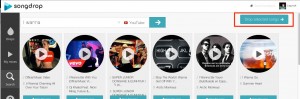
After adding songs, select "Drop Select Songs."
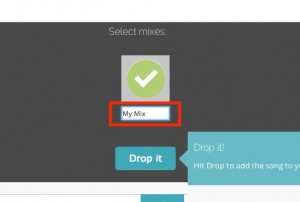
Type a title for the selected songs and select "Drop it."
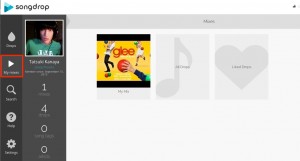
They're registered in "My Mixers."
By repeating the above, you can create multiple playlists to suit your genres and tastes.
Managing playlists
Click a playlist you've created to manage it.
Embedding in a blog or website
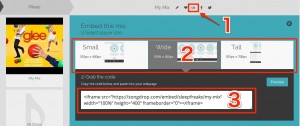
- 1_Click the embed icon
- 2_Choose one of three sizes
- 3_Code is displayed; paste it into your blog or website
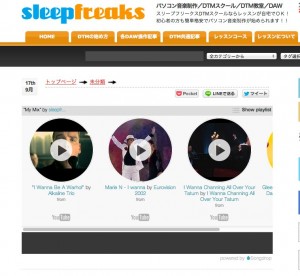
We placed one on our website.
Posting to Facebook and Twitter
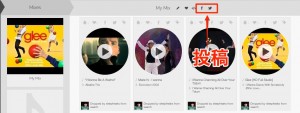
It's very easy.
Just click each icon to post.
Editing playlists
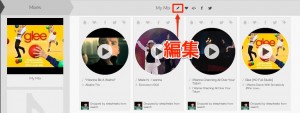
The pencil icon lets you edit playlists and songs.
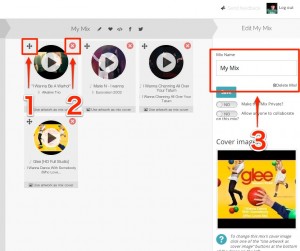
- 1_Remove songs from the playlist
- 2_Drag songs to change their order
- 3_Rename or delete the playlist
There are many more operations,
but with these basics you can already fully enjoy "Songdrop"!
Frequently asked questions
Q1. What do I need to create a playlist in Songdrop?
First, register an account (logging in with Facebook is also fine). Then enter an artist or song name in Search and add songs with "Drop this song." After selecting several, use "Drop Select Songs" to give the playlist a title and save it.
Q2. Can I share my playlists with others?
Yes. Besides posting to Facebook and Twitter, you can embed playlists in blogs and websites. Just get the code from the embed icon and paste it to share easily.
Q3. Which browser should I use?
We recommend Chrome (Google Chrome). With the extension installed, you can more easily add songs you like to playlists while browsing the web.
NEW ARTICLES
Latest English Articles











