
Skitch is screenshot software that lets you easily capture and edit your desktop. You can capture the full screen or a selected area, add text and shapes, and change colors and sizes, all with intuitive operations for high-quality image editing. It is free, combines good design with functionality, and is useful in many situations, such as work reports, sharing images with friends, and recording your screen during DTM production. It also works with cloud services such as Evernote, making it an ideal tool for anyone who wants a more efficient digital workflow.
Excellent in Design, Features, and Ease of Use
Not only while working but in everyday computer use,
you sometimes want to record your desktop screen or send it to a friend.
That's when Skitch comes in handy.

Download URL (free): http://skitch.com/
It handles text and shapes, resizing, colors, saving, and more with simple operations,
so you'll lose any desire to use other software (lol).
How to Use Skitch
When you open the software, a screen like this appears.
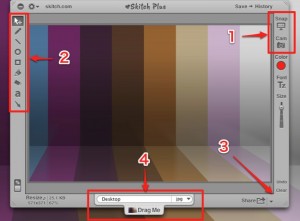
- 1_Choose whether to capture the whole desktop or a selected area
- 2_You can write text on the captured image (the "a" button), move what you wrote (the arrow button), and
do various other edits. You can also change the color, font, and size in the right-hand panel. - 3_Drag the edge of the window to adjust the image size and the area used
- 4_When you finish editing, give it a name and drag it to the desktop, and you're done
Skitch makes surprisingly easy, great-looking screenshots,
so be sure to try it.
Frequently asked questions
Q1. Is Skitch really free?
Yes. Skitch is completely free screenshot software. There are no extra charges or premium features, and you can use every feature right after downloading it.
Q2. In what format are images captured with Skitch saved?
You can save images edited in Skitch to the desktop by drag and drop. Common formats such as PNG and JPEG are supported, so you can use them as is in other applications.
Q3. Is it hard to use Skitch with Evernote or Droplr?
No. Skitch works easily with the cloud note service Evernote and the file-sharing software Droplr. After capturing and editing, you can upload directly to these services, making your workflow smoother.
NEW ARTICLES
Latest English Articles











