
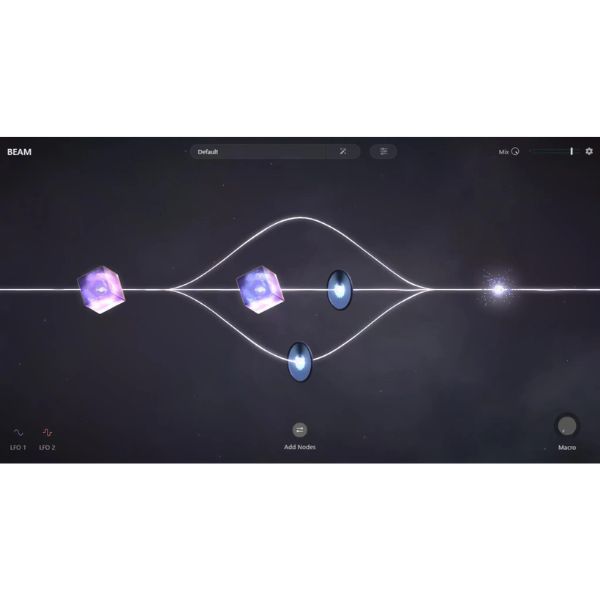
"BEAM," a multi-effect plug-in released by Lunacy on March 29, is an innovative sound-design tool that lets you branch audio paths freely and arrange multiple effects intuitively. By visually managing the flow of the audio signal with "streams" and freely placing effects called "nodes" (reverb, granular, filter), it enables original sound design that conventional fixed effects cannot achieve. With a wealth of presets and an intuitive UI, a wide range of users from beginners to professionals can put it to work right away, and it could be purchased for $59, 40% off, in a launch sale until April 24.
Lunacy Releases the Multi-Effect "BEAM"!
Effects are indispensable in music production, but with so many plug-ins out there, have you ever wished you could build your own routing more flexibly and intuitively?
Solving that problem in one go is "BEAM," a multi-effect plug-in from Lunacy released on March 29.
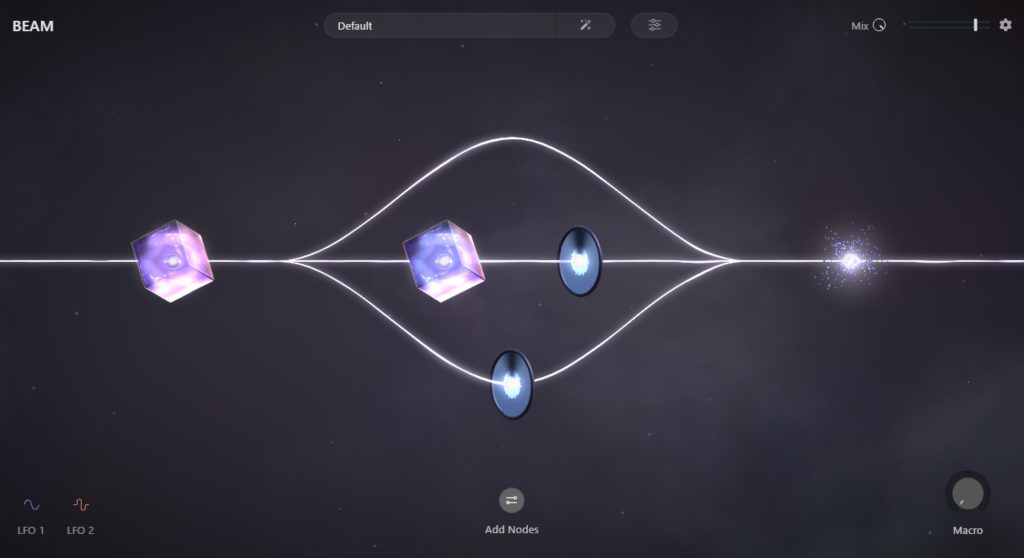
BEAM's biggest feature is that you can branch the audio path freely and edit and place multiple effects on it.
This sets it apart from conventional fixed effects, enabling original sound design.
It also combines eye-catching visual beauty with simplicity that allows intuitive operation.
Being able to grasp complex routing and the state of effects visually is groundbreaking.
First, let's listen to how the sound changes with BEAM.
Compared with the original sound in A, B and C use presets included with BEAM.
For comparison, B uses a preset where you can still hear the original sound, and C uses a preset that transforms it significantly.
In this way, BEAM has the potential to bring new ideas and inspiration just by applying presets.
About the Presets
BEAM comes with a wealth of presets.
First, try the presets to explore what BEAM can do.
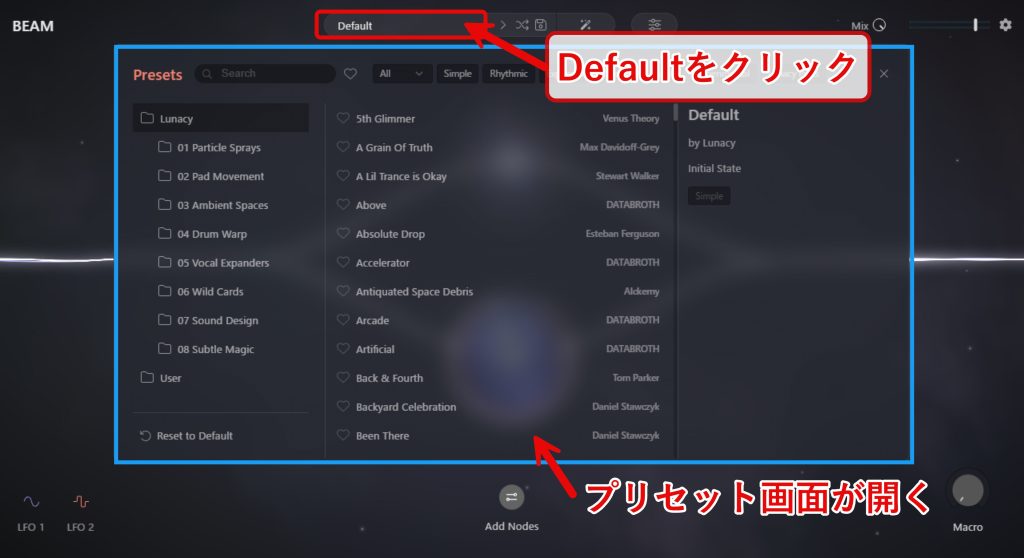
Click the area labeled "Default" to show the preset screen.
By selecting the folders on the left or categories such as "All" listed below Default, you can narrow down to more specific recommended presets.
If you have a specific part in mind, clicking "All" lets you choose by part, so you can quickly find the ideal preset for the sound you are applying effects to.
BEAM's Core Functions

From here, we introduce the core functions for using BEAM.
As mentioned at the beginning, the following two points are distinctive elements of BEAM not found in other plug-ins.
- You can branch the audio path freely
- You can freely place the provided effects
Streams: Representing the Audio Path

When you launch BEAM, a line appears in the center of the screen.
In BEAM, this line is called a "stream".
A stream is like a road showing the flow of the audio signal.
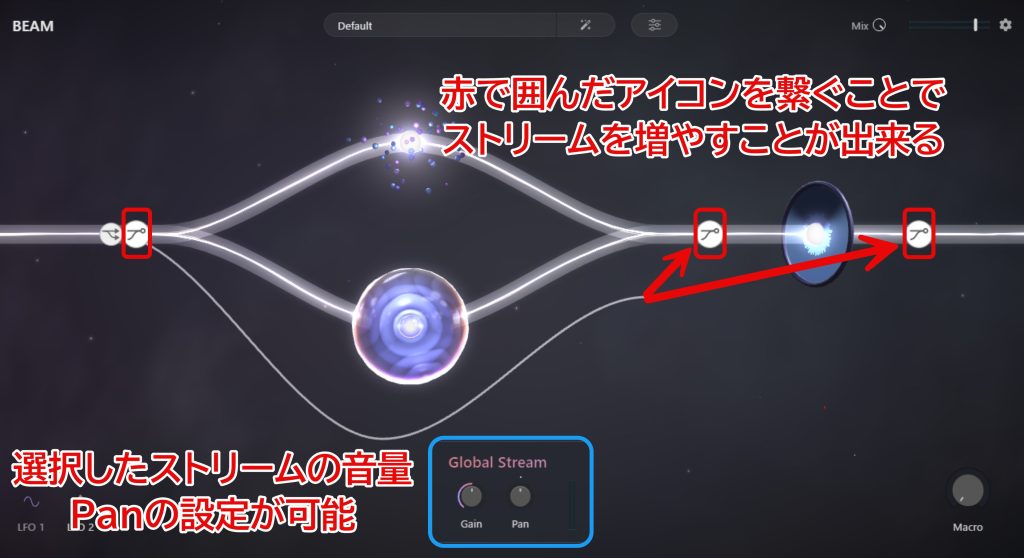
Click a stream to show branch-point icons.
Drag from a branch-point icon to another icon to connect them and create a new stream.
Each time you add a stream, new branch-point icons appear, a design that is also easy to operate visually.
Clicking a branch-point icon shows Gain (volume) and Pan (left-right position) parameters, which you can set individually.
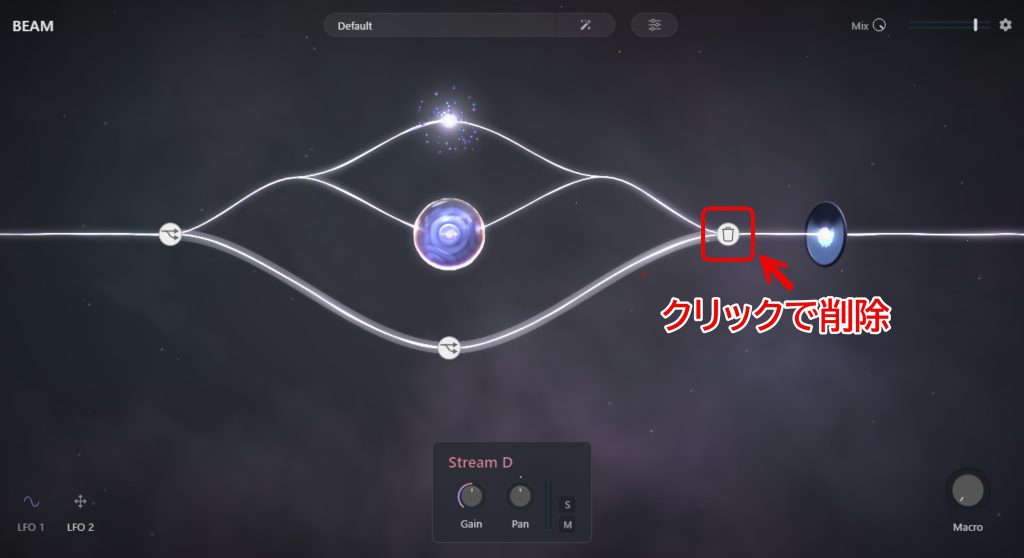
The above shows the result after adding a stream.
Click an added stream to show a trash can icon.
Click the icon to delete the stream easily, which also makes it easy to experiment with creating streams.
Nodes: Representing Effects
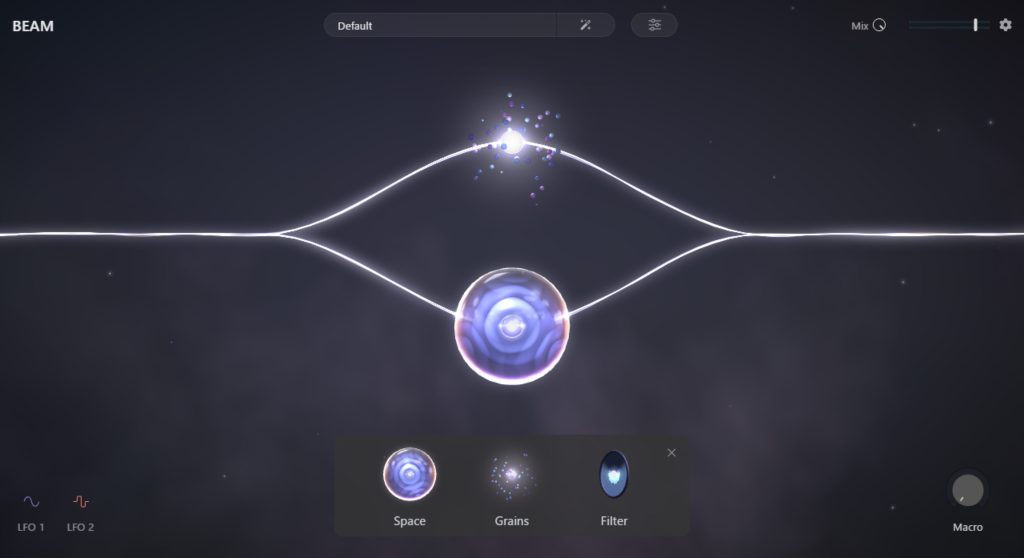
Next, let's look at the second core element, the effects.
In BEAM, effects are called "nodes".
The three nodes available at launch are as follows.
- Space (reverb): an effect that adds spatial depth
- Grain (granular): an effect that breaks sound into tiny particles to create new textures
- Filter: an effect that emphasizes or suppresses specific frequency ranges
For now there are these three nodes, but various other types of nodes are planned to be added later.
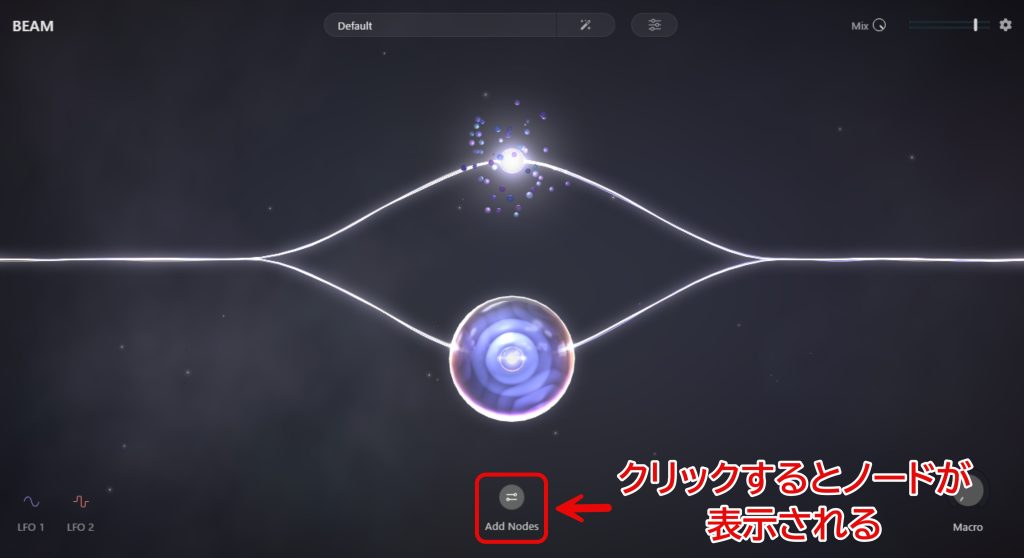
Click "Add Nodes" to show the visuals for each node.
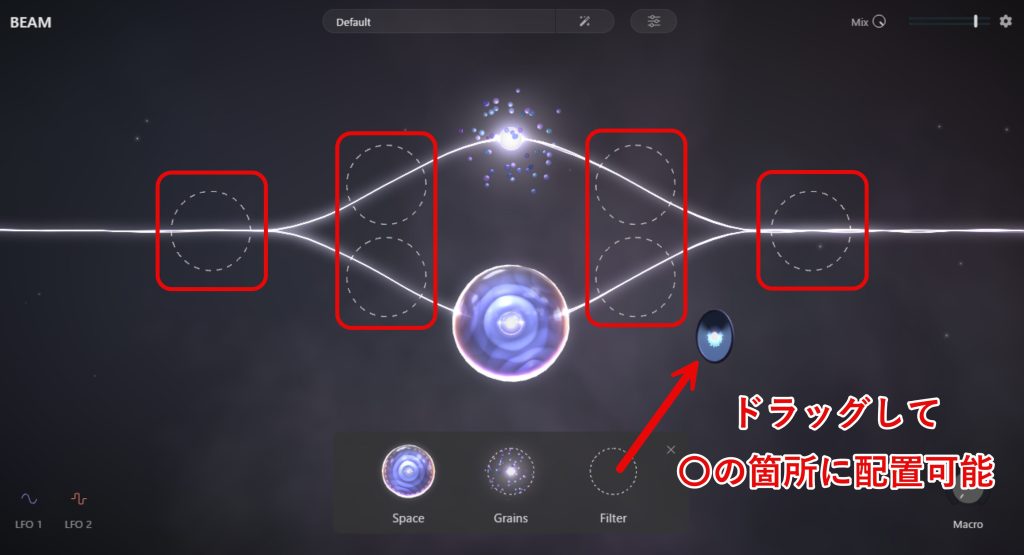
As shown above, when you grab the visual of the node you want to use, the places where it can be placed are shown as dotted circles, and dragging it to the desired place adds it.
You can also edit the nodes you have added.
To edit one, click the visual you added.
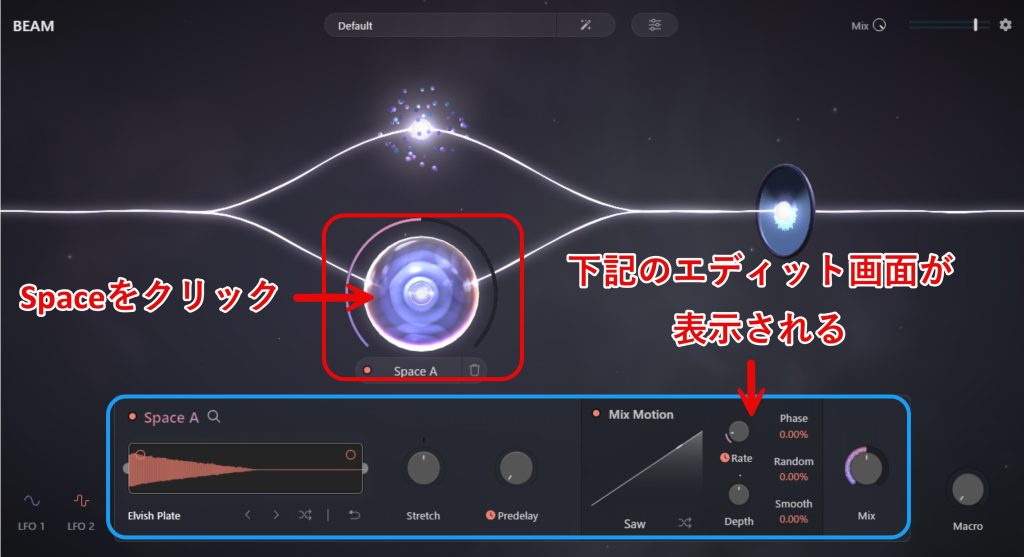
For example, clicking the Space (reverb) node opens the edit screen shown above, enabling more detailed sound design.
Grain (granular) and Filter open their edit screens the same way, so if you want to get closer to the sound you like, it is a good idea to explore them.
Nodes also show a trash can mark when you click their visual, and clicking it deletes them easily.
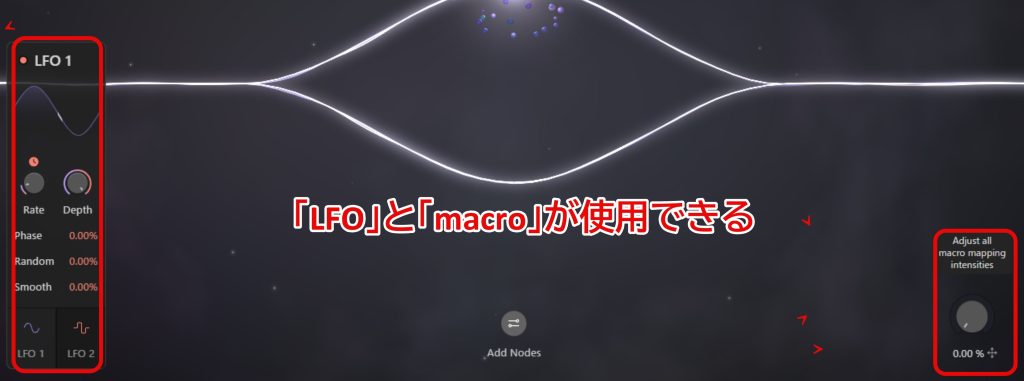
In addition to streams and nodes, "LFO" and "Macro" functions are also included, useful for those who want even more refined sound design.
Having these functions as well makes it a highly flexible plug-in.
What we introduced here is an overview of BEAM and its basic use.
It is designed to be operated intuitively, like a game, so once you discover your own ways to use it, it should become a ready-to-use tool for a wide range of users, from beginners to professionals.
Its high quality and ease of use are such that once you use it, you will fully appreciate its appeal.
Sale Information and Purchase Page
To celebrate its release, BEAM is sold at 40% off until April 24.
* Sold for $59 during the above period, down from its $99 price
For more detailed information, please see Lunacy's [website].
Be sure to buy it during this great sale and experience moments that spark your creativity and the new fun of music production!
▼ BEAM purchase page
Frequently Asked Questions
Q1. What is BEAM, and what are its main features?
BEAM is a multi-effect plug-in from Lunacy whose key feature is that you can branch the audio path freely and place multiple effects (nodes) freely. Its visually clear interface lets you handle complex routing intuitively.
Q2. What effects can be used in BEAM?
At launch, it includes three types of nodes, Space (reverb), Grain (granular) and Filter, with various other types planned to be added. Each node can be edited in detail.
Q3. How much does BEAM cost? Is there a way to buy it at a good price?
The regular price is $99, but it could be purchased for $59, 40% off, in the launch sale until April 24. This was a good opportunity to get a high-performance plug-in usable by beginners and professionals at an affordable price.
Q4. Can beginners master it?
BEAM is designed to be operated intuitively, like a game, and comes with a wealth of presets. Because you can learn while trying presets, it is easy for beginners to start, and the design lets you apply more as you improve.
Q5. What additional functions does BEAM have?
In addition to streams and nodes, it also includes "LFO" and "Macro" functions, enabling more refined and flexible sound design. Combining them greatly expands your range of expression.
NEW ARTICLES
Latest English Articles











