
Droplr solves a problem you often face in DTM production and in business: sending and receiving large files. This cloud file-sharing software lets you upload any file to a server with an intuitive drag-and-drop operation, and the recipient can download it simply from the automatically generated link you share. It offers 1GB for free and up to 100GB for about 300 yen a month, and its seamless use across Mac, Windows, and iPhone is a big attraction. It dramatically streamlines file management between multiple computers and within teams, making it ideal for sharing song files and project files in DTM production.
Easily Upload Any File to a Server
In DTM, of course, and in everyday life too,
"the file is too big to send by email"
or "I have several computers and want to manage files between them smoothly"
are very common problems.
That's where Droplr comes in handy.
You can upload and manage files efficiently by drag and drop.

Download link
https://droplr.com/hello
How to Use Droplr

When you launch the software, an icon appears in the menu bar (the taskbar on Windows).

↑ Just drag and drop the file you want to upload.

↑ When the upload is complete, a link is created automatically.
The link is also copied automatically,
so just paste it into an email to the person you want to send it to.
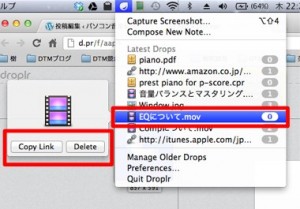
↑ You can view your history as a list and easily delete items.
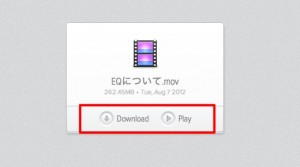
↑ The person who receives the link can download the file like this.
Music and video files can be played in the browser without downloading.
What I Like About It
I use it to share files with students, instructors, and staff.
- Simple operation: just drag and drop
- Photos, text, videos, URLs, DTM files, and more: just drag them in!
- Works seamlessly on Mac, Windows, and iPhone
- Up to 1GB even with the free version
- The paid version offers up to 100GB for about 300 yen a month
- By logging in with the same account on different computers,
you can see your entire file history and download everything - If everyone involved in a project uses the same account,
everyone can download files that anyone uploads
I'm praising it to the skies,
but personally I think it's an amazing piece of software.
So far, I can't find anything bad about it.
Try it for free first. I'm sure it will be useful.
Frequently asked questions
Q1. Can Droplr send large files that can't be attached to an email?
Yes. Even large files that exceed email size limits can be downloaded by the recipient simply by sharing a link through Droplr. The free version supports up to 1GB, and the paid version up to 100GB.
Q2. Can I share DTM files (DAW project files) with Droplr?
Yes. Droplr supports any file format, so you can share DTM project files from Logic, Cubase, and other DAWs without any problem. Multiple producers can also manage files with the same account.
Q3. Can I use Droplr for free?
Yes. The free version can be used up to 1GB, with the basic file-sharing features available. If you need more capacity, you can expand to 100GB with the paid version for about 300 yen a month.
NEW ARTICLES
Latest English Articles











