
Using one software synth across multiple MIDI tracks in Ableton Live is an effective way to deal with high CPU usage, a major challenge in DAW production. By using a multitimbral software synth such as Kontakt and assigning instruments to different MIDI channels, you can play several instruments at once, such as piano, bass, guitar, and synths, while saving a great deal of CPU. By setting up I/O and switching recording between MIDI tracks, you can produce sophisticated songs with limited computer resources without sacrificing freedom in sound design.
Extremely Effective for Saving CPU
One thing you cannot do without when using a DAW is software synths.
They can produce all kinds of sounds, from piano and drums to ethnic instruments,
so you can choose any instrument you like.
On the other hand,
they often push CPU usage up and get in the way of your work.
To solve this problem, many products
let you load multiple instruments inside a single software synth.
As a result,
even when you use several instruments, such as piano, bass, guitar, and synths,
a single software synth is enough, which saves a great deal of CPU.
How to Use Multiple Sounds in One Software Synth
Here, we explain using the multitimbral software synth Kontakt.
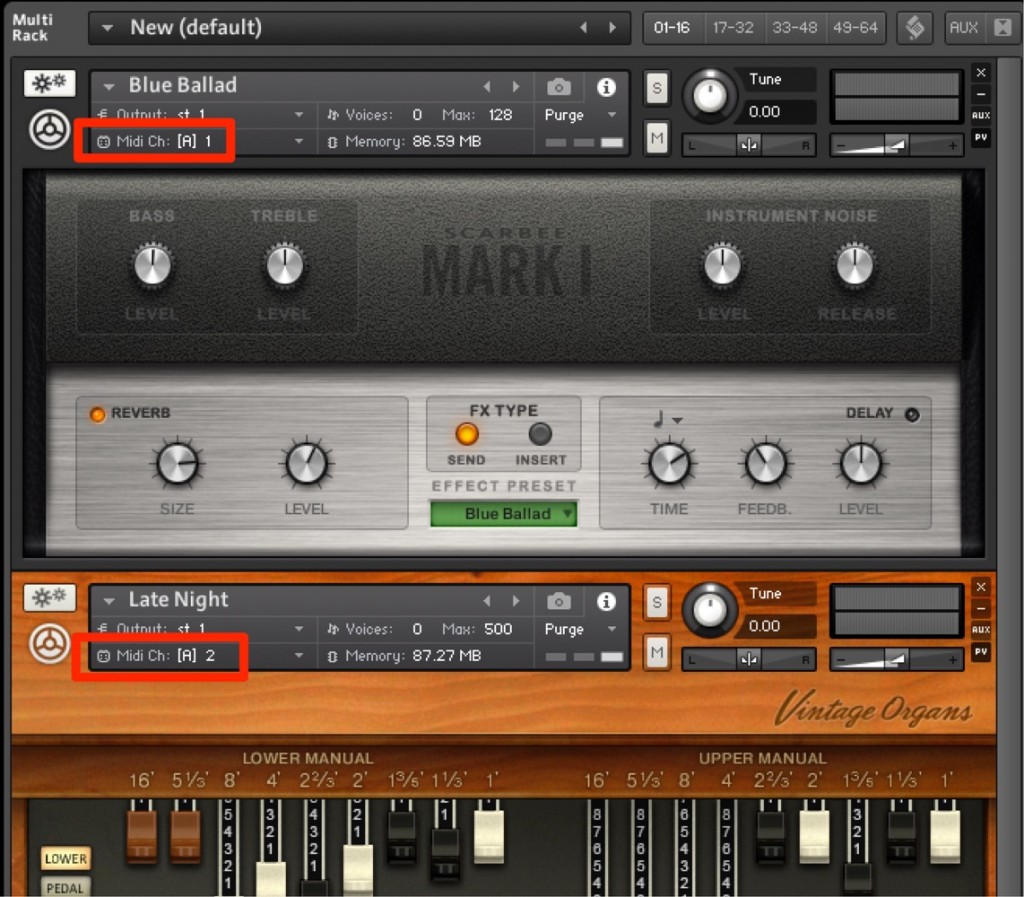
Every multitimbral software synth has MIDI channels.
Assign a different MIDI channel to each instrument.

Create as many MIDI tracks as you have instruments.

Turn on "I/O."

- Upper field_Select the software synth you want to play
- Lower field_The software synth's MIDI channel
This completes the setup.

By switching the record button on each MIDI track,
you also switch the sound inside the software synth.
Frequently asked questions
Q1. Why is one multitimbral software synth easier on the CPU than several software synths?
Each software synth you load consumes CPU resources, but a multitimbral synth manages multiple sounds in a single process, so the overall CPU load is lower and your work becomes more stable.
Q2. What is the difference between a MIDI channel and a MIDI track?
A MIDI channel is a setting that identifies an instrument inside a software synth, while a MIDI track is an individual track in the DAW for controlling it. You control the different MIDI channels inside one software synth with multiple MIDI tracks.
Q3. Can I use the same method with multitimbral synths other than Kontakt?
Yes. Multitimbral synths such as Omnisphere and Trilian have MIDI channel features, so you can manage multiple sounds in one instrument in the same way.
NEW ARTICLES
Latest English Articles











