
With Ableton Live, you can freely change the tempo within a song and create music with richer expression. You can change the tempo for each section, such as the verse or chorus, gradually speed up or slow down, or change the tempo abruptly to switch the song's direction. Just click and drag tempo points on the Master track to edit like a pro and greatly enhance the character and groove of the whole song.
Add Expression by Changing the Tempo Within a Song
You can change the tempo for each section, such as the verse or chorus
, or gradually speed the song up or slow it down.
This opens up even more ways to express your music.
This article will deepen your understanding.

Changing the Tempo
The operation is very similar to the automation covered in the previous article.
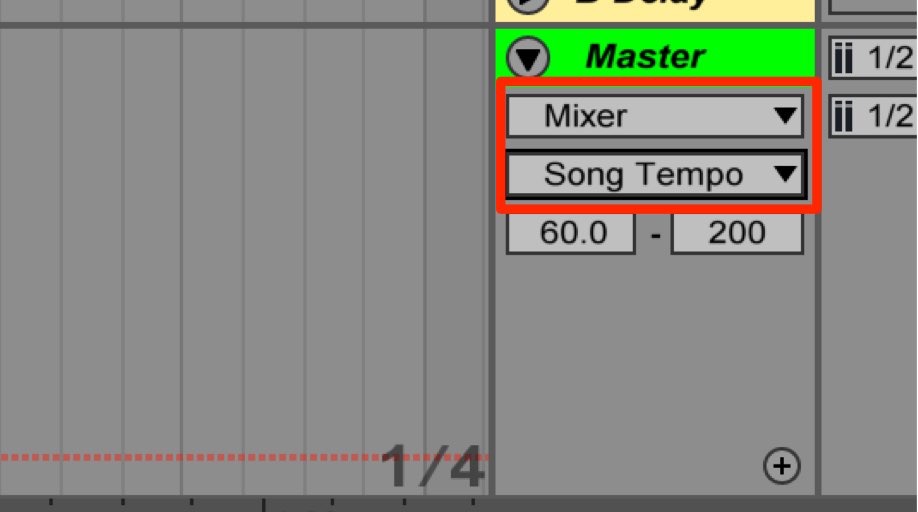
Look at the "Master" track at the very bottom of Arrangement View.
As in the area outlined in red, change
- Upper field_Mixer
- Lower field_Song Tempo
as shown.
Setting a Gradual Tempo Change
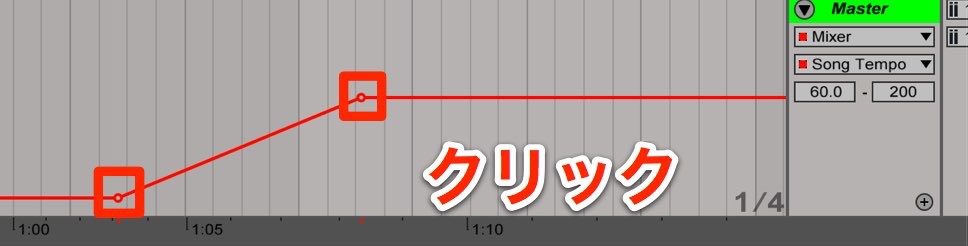
Click to add a tempo point,
then drag it to choose any tempo and position.
In the example above, the tempo gradually rises.
By lowering it instead,
you can create effects such as the performance gradually slowing down as the song ends.
Setting an Abrupt Tempo Change
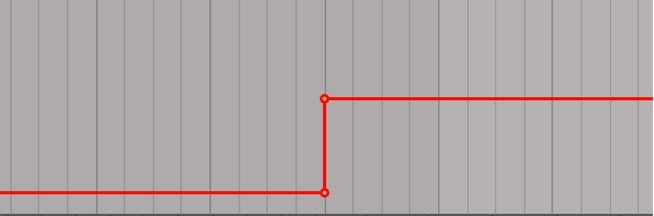
With a setting like this, the tempo changes suddenly.
It is well suited to completely changing the song's direction, for example.
Deleting Tempo Points
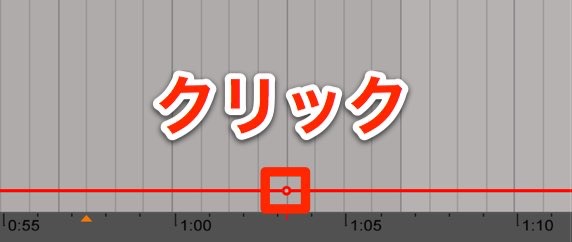
Click a tempo point to delete it.
Frequently asked questions
Q1. How do I change the tempo gradually in Ableton Live?
In "Song Tempo" in the "Master" section at the bottom of Arrangement View, click to add tempo points and drag them to set any tempo and position. Creating multiple points gives you an accelerating or decelerating effect.
Q2. What is an effective use of a sudden tempo change within a song?
Abrupt tempo changes work well when moving into the chorus or switching sections. Placing the points as close together as possible makes the tempo change suddenly, which can dramatically change the impression of the song.
Q3. How do I delete a tempo point I have set?
Simply click the tempo point you want to delete. By deleting only the points you choose from among several, you can freely adjust your tempo settings.
NEW ARTICLES
Latest English Articles











